Footprinting — Skills Assessment [Part 1] (2025)
The HTB Footprinting module Skill Assessment walkthroughs will involve two parts, the first one will consist of Easy & Platform, while part two will solely focus on Hard.
Footprinting Lab — Easy
“We were commissioned by the company Inlanefreight Ltd to test three different servers in their internal network. The company uses many different services, and the IT security department felt that a penetration test was necessary to gain insight into their overall security posture.
The first server is an internal DNS server that needs to be investigated. In particular, our client wants to know what information we can get out of these services and how this information could be used against its infrastructure. Our goal is to gather as much information as possible about the server and find ways to use that information against the company. However, our client has made it clear that it is forbidden to attack the services aggressively using exploits, as these services are in production.
Additionally, our teammates have found the following credentials “ceil:qwer1234”, and they pointed out that some of the company’s employees were talking about SSH keys on a forum.
The administrators have stored a flag.txt file on this server to track our progress and measure success. Fully enumerate the target and submit the contents of this file as proof.”
So, right off the bat from this description, we are already provided with credentials for user Ceil. I ran an nmap scan to see what ports were open.
nmap 10.129.xxx.xxx -sV -sC -p- --min-rate=1000 -v -oN results.txt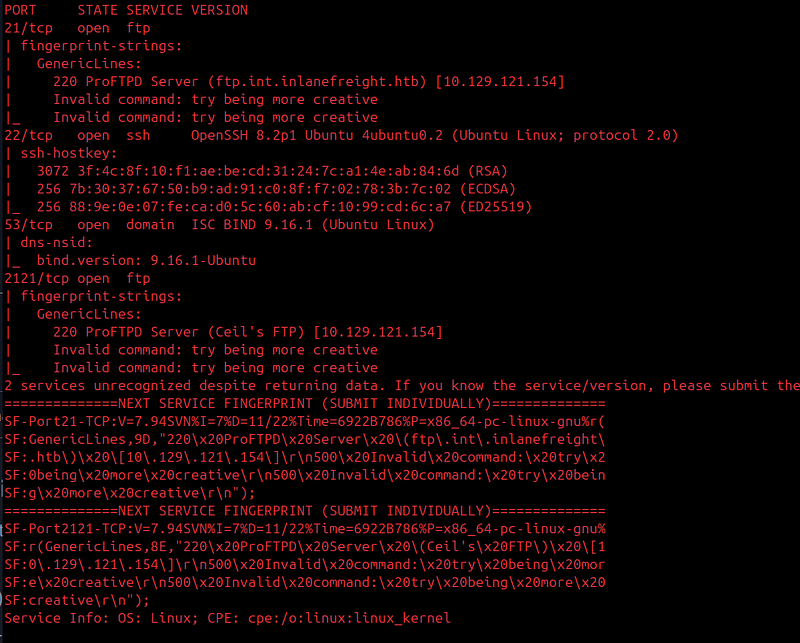
So it appears we have four ports open, 21, 22, 53, and 2121. Given there are two FTP servers with open ports, this is where I would be attempting to log in with the provided credentials.
I first log into the regular FTP server (port 21). After making a quick search in the FTP server, I came up empty-handed.
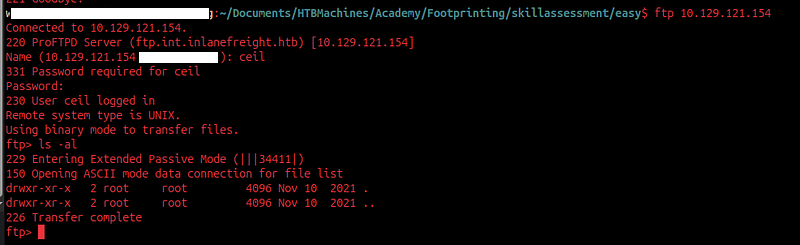
However, there was a second FTP server open as seen in the original nmap scan results, named “Ceil’s FTP” server. I go ahead and log into this one next with the same credentials and the same original ftp command, but with the added -P 2121 parameter to indicate that we're logging into a different version of the FTP service on our target server.
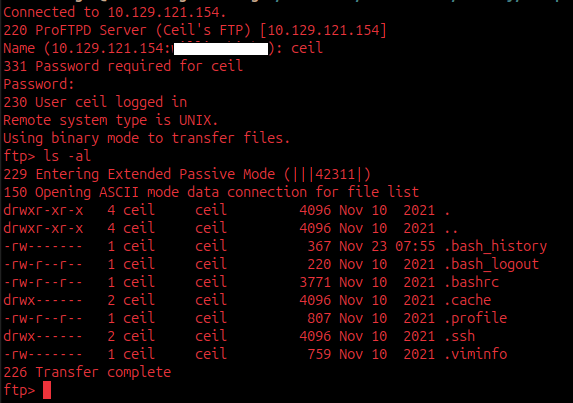
Using the same commands to enumerate the target’s second FTP server, we come across a wealth of information, and as the scenario description indicated, we are merely looking for exposed SSH keys, which are the keys we need to be able to log into our target’s account w/o a password. I went ahead and exfiltrated most of the .ssh directory over to my host machine for later use.
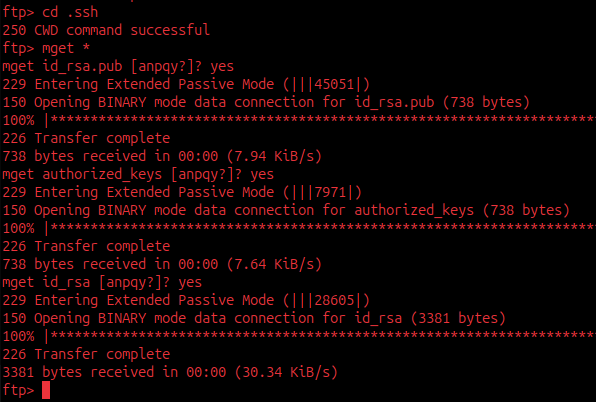
Now that we have the id_rsa file, I make an attempt to SSH into Ceil's account; however, I run into a simple obstacle regarding the permission issues (0644) of the id_rsa file that was exfiltrated, but there is an easy fix for this, which the command below addresses.
ssh ceil@10.129.xxx.xxx -i id_rsa
chmod 600 id_rsa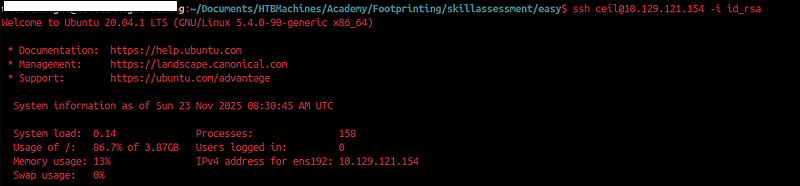
After successfully SSHing, I go ahead and run a find command to locate the flag.txt file since it wasn't present in the current directory. After about a few seconds, I found the flag's location and uncovered it.

Footprinting Lab — Platform
“This second server is a server that everyone on the internal network has access to. In our discussion with our client, we pointed out that these servers are often one of the main targets for attackers and that this server should be added to the scope.
Our customer agreed to this and added this server to our scope. Here, too, the goal remains the same. We need to find out as much information as possible about this server and find ways to use it against the server itself. For the proof and protection of customer data, a user named HTB has been created. Accordingly, we need to obtain the credentials of this user as proof.”
Unlike the last lab, we are not provided with credentials. This time we have to “obtain the credentials” for the HTB user.
I ran an nmap scan to see what I was dealing with, and there were several ports open, making the list very long, so instead of a screenshot I will paste the output as text.
nmap 10.129.xxx.xxx -sV -sC -p- --min-rate=1000 -v -oN results.txtPORT STATE SERVICE VERSION
111/tcp open rpcbind 2-4 (RPC #100000)
| rpcinfo:
| program version port/proto service
| 100000 2,3,4 111/tcp rpcbind
| 100000 2,3,4 111/tcp6 rpcbind
| 100000 2,3,4 111/udp rpcbind
| 100000 2,3,4 111/udp6 rpcbind
| 100003 2,3 2049/udp nfs
| 100003 2,3 2049/udp6 nfs
| 100003 2,3,4 2049/tcp nfs
| 100003 2,3,4 2049/tcp6 nfs
| 100005 1,2,3 2049/tcp mountd
| 100005 1,2,3 2049/tcp6 mountd
| 100005 1,2,3 2049/udp mountd
| 100005 1,2,3 2049/udp6 mountd
| 100021 1,2,3,4 2049/tcp nlockmgr
| 100021 1,2,3,4 2049/tcp6 nlockmgr
| 100021 1,2,3,4 2049/udp nlockmgr
| 100021 1,2,3,4 2049/udp6 nlockmgr
| 100024 1 2049/tcp status
| 100024 1 2049/tcp6 status
| 100024 1 2049/udp status
|_ 100024 1 2049/udp6 status
135/tcp open msrpc Microsoft Windows RPC
139/tcp open netbios-ssn Microsoft Windows netbios-ssn
445/tcp open microsoft-ds?
2049/tcp open nlockmgr 1-4 (RPC #100021)
3389/tcp open ms-wbt-server Microsoft Terminal Services
| ssl-cert: Subject: commonName=WINPLATFORM
| Issuer: commonName=WINPLATFORM
| Public Key type: rsa
| Public Key bits: 2048
| Signature Algorithm: sha256WithRSAEncryption
| Not valid before: 2025-11-22T08:37:23
| Not valid after: 2026-05-24T08:37:23
| MD5: 9db3:d0cc:160c:d000:46e4:f0ad:7ea8:198b
|_SHA-1: acb6:5531:45dc:fc78:ff27:c6fa:a260:e0da:4fa1:360f
| rdp-ntlm-info:
| Target_Name: WINPLATFORM
| NetBIOS_Domain_Name: WINPLATFORM
| NetBIOS_Computer_Name: WINPLATFORM
| DNS_Domain_Name: WINPLATFORM
| DNS_Computer_Name: WINPLATFORM
| Product_Version: 10.0.17763
|_ System_Time: 2025-11-23T08:40:59+00:00
|_ssl-date: 2025-11-23T08:41:07+00:00; 0s from scanner time.
5985/tcp open http Microsoft HTTPAPI httpd 2.0 (SSDP/UPnP)
|_http-server-header: Microsoft-HTTPAPI/2.0
|_http-title: Not Found
47001/tcp open http Microsoft HTTPAPI httpd 2.0 (SSDP/UPnP)
|_http-server-header: Microsoft-HTTPAPI/2.0
|_http-title: Not Found
49664/tcp open msrpc Microsoft Windows RPC
49665/tcp open msrpc Microsoft Windows RPC
49666/tcp open msrpc Microsoft Windows RPC
49667/tcp open msrpc Microsoft Windows RPC
49668/tcp open msrpc Microsoft Windows RPC
49679/tcp open msrpc Microsoft Windows RPC
49680/tcp open msrpc Microsoft Windows RPC
49681/tcp open msrpc Microsoft Windows RPC
Service Info: OS: Windows; CPE: cpe:/o:microsoft:windows
Host script results:
| smb2-security-mode:
| 3:1:1:
|_ Message signing enabled but not required
| smb2-time:
| date: 2025-11-23T08:41:03
|_ start_date: N/ABased on what I am seeing, I am dealing with a Windows instance here, so I looked toward probing the SMB portions first. I ran the enum4linux-ng tool against the server.
xxxx@wxxx:~/Documents/HTBMachines/Active/Cicada/enum4linux-ng$ python3 enum4linux-ng.py  10.129.202.41
ENUM4LINUX - next generation (v1.3.4)

 ==========================
|    Target Information    |
 ==========================
[*] Target ........... 10.129.202.41
[*] Username ......... ''
[*] Random Username .. 'logynecz'
[*] Password ......... ''
[*] Timeout .......... 5 second(s)

 ======================================
|    Listener Scan on 10.129.202.41    |
 ======================================
[*] Checking LDAP
[-] Could not connect to LDAP on 389/tcp: connection refused
[*] Checking LDAPS
[-] Could not connect to LDAPS on 636/tcp: connection refused
[*] Checking SMB
[+] SMB is accessible on 445/tcp
[*] Checking SMB over NetBIOS
[+] SMB over NetBIOS is accessible on 139/tcp

 ============================================================
|    NetBIOS Names and Workgroup/Domain for 10.129.202.41    |
 ============================================================
[-] Could not get NetBIOS names information via 'nmblookup': timed out

 ==========================================
|    SMB Dialect Check on 10.129.202.41    |
 ==========================================
[*] Trying on 445/tcp
[+] Supported dialects and settings:
Supported dialects:
  SMB 1.0: false
  SMB 2.02: true
  SMB 2.1: true
  SMB 3.0: true
  SMB 3.1.1: true
Preferred dialect: SMB 3.0
SMB1 only: false
SMB signing required: false

 ============================================================
|    Domain Information via SMB session for 10.129.202.41    |
 ============================================================
[*] Enumerating via unauthenticated SMB session on 445/tcp
[+] Found domain information via SMB
NetBIOS computer name: WINPLATFORM
NetBIOS domain name: ''
DNS domain: WINPLATFORM
FQDN: WINPLATFORM
Derived membership: workgroup member
Derived domain: unknown

 ==========================================
|    RPC Session Check on 10.129.202.41    |
 ==========================================
[*] Check for null session
[-] Could not establish null session: STATUS_ACCESS_DENIED
[*] Check for random user
[-] Could not establish random user session: STATUS_LOGON_FAILURE
[-] Sessions failed, neither null nor user sessions were possible

 ================================================
|    OS Information via RPC for 10.129.202.41    |
 ================================================
[*] Enumerating via unauthenticated SMB session on 445/tcp
[+] Found OS information via SMB
[*] Enumerating via 'srvinfo'
[-] Skipping 'srvinfo' run, not possible with provided credentials
[+] After merging OS information we have the following result:
OS: Windows 10, Windows Server 2019, Windows Server 2016
OS version: '10.0'
OS release: '1809'
OS build: '17763'
Native OS: not supported
Native LAN manager: not supported
Platform id: null
Server type: null
Server type string: null

[!] Aborting remainder of tests since sessions failed, rerun with valid credentials

Completed after 8.94 seconds
xxxx@wxxx:~/Documents/HTBMachines/Active/Cicada/enum4linux-ng$
I didn’t find anything useful based on the log shown above.
I look back at the nmap results to see which service I could poke around next, and I noticed there is mention of NFS. I go ahead and run a command to see if there’s anything interesting an external user can see.
showmount -e 10.129.xxx.xx
After about 30 seconds of running the showmount command, it produces a result saying there is a /TechSupport directory open for "everyone". I go ahead and mount it to my ./Victim_NFS folder I created for this purpose. There was a confusing series of command executions because I wasn't able to simply mount it as a regular user or even view it.
mkdir -p ./NFS
mount -t nfs 10.129.xxx.xx:/TechSupport ./Victim_NFS -o nolock (MAY need sudo for some)
cd ./Victim_NFS/
Opening and viewing the directory, we have tons of .txt files regarding tickets.
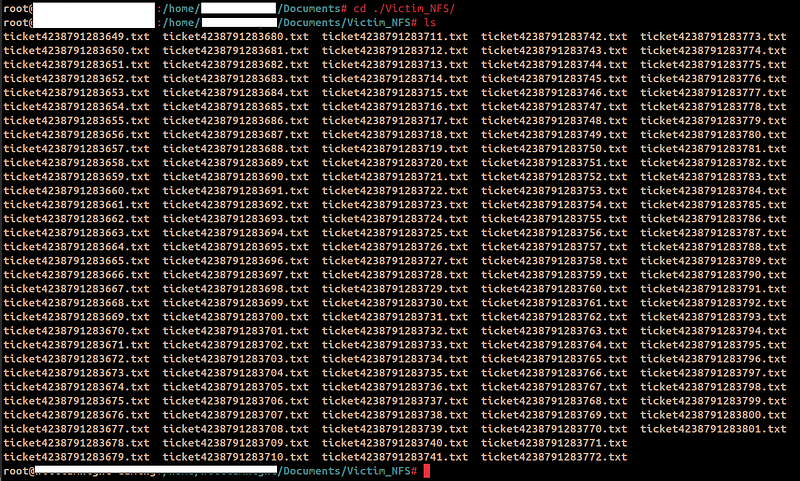
I looked through 3 of them, but apparently, most, if not all, appeared to be dummy files. I ran a quick find command to scavenge and see if there's any non-empty .txt file that I can view for information, and luckily there was one.
find . -type f -size +0c
Upon viewing the non-empty file contents, there is some juicy information.
Conversation with InlaneFreight Ltd

Started on November 10, 2021 at 01:27 PM London time GMT (GMT+0200)
---
01:27 PM | Operator: Hello,.

So what brings you here today?
01:27 PM | alex: hello
01:27 PM | Operator: Hey alex!
01:27 PM | Operator: What do you need help with?
01:36 PM | alex: I run into an issue with the web config file on the system for the smtp server. do you mind to take a look at the config?
01:38 PM | Operator: Of course
01:42 PM | alex: here it is:

 1smtp {
 2    host=smtp.web.dev.inlanefreight.htb
 3    #port=25
 4    ssl=true
 5    user="alex"
 6    password="x"
 7    from="alex.g@web.dev.inlanefreight.htb"
 8}
 9
10securesocial {
11
12    onLoginGoTo=/
13    onLogoutGoTo=/login
14    ssl=false
15
16    userpass {
17     withUserNameSupport=false
18     sendWelcomeEmail=true
19     enableGravatarSupport=true
20     signupSkipLogin=true
21     tokenDuration=60
22     tokenDeleteInterval=5
23     minimumPasswordLength=8
24     enableTokenJob=true
25     hasher=bcrypt
26 }
27
28     cookie {
29     #       name=id
30     #       path=/login
31     #       domain="10.129.2.59:9500"
32            httpOnly=true
33            makeTransient=false
34            absoluteTimeoutInMinutes=1440
35            idleTimeoutInMinutes=1440
36    }
I get credentials for user alex from this .txt ticket log, which allows me to perform more extensive enumeration. I run a second enum4linux-ng command with the credentials, and this time I get more results than the previous run.
ENUM4LINUX - next generation (v1.3.4)

 ==========================
|    Target Information    |
 ==========================
[*] Target ........... 10.129.202.41
[*] Username ......... 'alex'
[*] Random Username .. 'whoxyssl'
[*] Password ......... 'x'
[*] Timeout .......... 5 second(s)

 ======================================
|    Listener Scan on 10.129.202.41    |
 ======================================
[*] Checking LDAP
[-] Could not connect to LDAP on 389/tcp: connection refused
[*] Checking LDAPS
[-] Could not connect to LDAPS on 636/tcp: connection refused
[*] Checking SMB
[+] SMB is accessible on 445/tcp
[*] Checking SMB over NetBIOS
[+] SMB over NetBIOS is accessible on 139/tcp

 ============================================================
|    NetBIOS Names and Workgroup/Domain for 10.129.202.41    |
 ============================================================
[-] Could not get NetBIOS names information via 'nmblookup': timed out

 ==========================================
|    SMB Dialect Check on 10.129.202.41    |
 ==========================================
[*] Trying on 445/tcp
[+] Supported dialects and settings:
Supported dialects:
  SMB 1.0: false
  SMB 2.02: true
  SMB 2.1: true
  SMB 3.0: true
  SMB 3.1.1: true
Preferred dialect: SMB 3.0
SMB1 only: false
SMB signing required: false

 ============================================================
|    Domain Information via SMB session for 10.129.202.41    |
 ============================================================
[*] Enumerating via unauthenticated SMB session on 445/tcp
[+] Found domain information via SMB
NetBIOS computer name: WINPLATFORM
NetBIOS domain name: ''
DNS domain: WINPLATFORM
FQDN: WINPLATFORM
Derived membership: workgroup member
Derived domain: unknown

 ==========================================
|    RPC Session Check on 10.129.202.41    |
 ==========================================
[*] Check for null session
[-] Could not establish null session: STATUS_ACCESS_DENIED
[*] Check for user session
[+] Server allows session using username 'alex', password 'x'
[*] Check for random user
[-] Could not establish random user session: STATUS_LOGON_FAILURE

 ====================================================
|    Domain Information via RPC for 10.129.202.41    |
 ====================================================
[+] Domain: INFREIGHT
[H] Found domain/workgroup 'INFREIGHT' which is different from the currently used one 'WORKGROUP'.
[+] Domain SID: NULL SID
[+] Membership: workgroup member

 ================================================
|    OS Information via RPC for 10.129.202.41    |
 ================================================
[*] Enumerating via unauthenticated SMB session on 445/tcp
[+] Found OS information via SMB
[*] Enumerating via 'srvinfo'
[+] Found OS information via 'srvinfo'
[+] After merging OS information we have the following result:
OS: Windows 10, Windows Server 2019, Windows Server 2016
OS version: '10.0'
OS release: '1809'
OS build: '17763'
Native OS: not supported
Native LAN manager: not supported
Platform id: '500'
Server type: '0x9007'
Server type string: Wk Sv Sql NT SNT

 ======================================
|    Users via RPC on 10.129.202.41    |
 ======================================
[*] Enumerating users via 'querydispinfo'
[-] Could not find users via 'querydispinfo': STATUS_CONNECTION_DISCONNECTED
[*] Enumerating users via 'enumdomusers'
[-] Could not find users via 'enumdomusers': STATUS_CONNECTION_DISCONNECTED

 =======================================
|    Groups via RPC on 10.129.202.41    |
 =======================================
[*] Enumerating local groups
[-] Could not get groups via 'enumalsgroups domain': STATUS_CONNECTION_DISCONNECTED
[*] Enumerating builtin groups
[-] Could not get groups via 'enumalsgroups builtin': STATUS_CONNECTION_DISCONNECTED
[*] Enumerating domain groups
[-] Could not get groups via 'enumdomgroups': STATUS_CONNECTION_DISCONNECTED

 =======================================
|    Shares via RPC on 10.129.202.41    |
 =======================================
[*] Enumerating shares
[+] Found 5 share(s):
ADMIN$:
  comment: Remote Admin
  type: Disk
C$:
  comment: Default share
  type: Disk
IPC$:
  comment: Remote IPC
  type: IPC
Users:
  comment: ''
  type: Disk
devshare:
  comment: ''
  type: Disk
[*] Testing share ADMIN$
[+] Mapping: DENIED, Listing: N/A
[*] Testing share C$
[+] Mapping: DENIED, Listing: N/A
[*] Testing share IPC$
[+] Mapping: OK, Listing: NOT SUPPORTED
[*] Testing share Users
[+] Mapping: OK, Listing: OK
[*] Testing share devshare
[+] Mapping: OK, Listing: OK

 ==========================================
|    Policies via RPC for 10.129.202.41    |
 ==========================================
[*] Trying port 445/tcp
[-] SMB connection error on port 445/tcp: RPC_S_ACCESS_DENIED
[*] Trying port 139/tcp
[-] SMB connection error on port 139/tcp: session failed

 ==========================================
|    Printers via RPC for 10.129.202.41    |
 ==========================================
[+] No printers returned (this is not an error)

Completed after 28.92 seconds
With the new results, I can see there are some available shares shown in the output above, which were invisible to external users prior.
I used the smbclient tool to log into alex's account:
smbclient //10.129.137.184/Users -U alexAfter some time scavenging through what was there, I found an interesting folder in \alex\devshare labeled important.txt. These were the credentials to the Microsoft SQL Server application within the server.

After making attempts to log in using the mssqlclient.py tool, it wasn't working in an expected way.
TCP/3389 was open from earlier according to the nmap log, aka RDP, so I log in and re-use alex’s credentials to connect using xfreerdp3.
xfreerdp3 /v:10.129.xxx.xx /u:alex /p:'x'On the Desktop, I see there is the SQL management application, and I proceed to open it.

Once it opens, it prompts for a login to access the SQL database. I attempted several times to use the credentials I found in the important.txt file, but it wasn't successful. I assumed it was correct since the user was "sa".
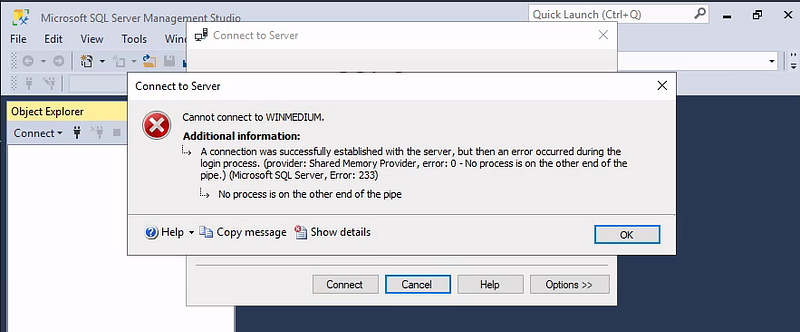
Then I realized I could try opening the same application w/ Administrator privileges, and when I inserted the password from that file, the authentication was successful this time into the database.
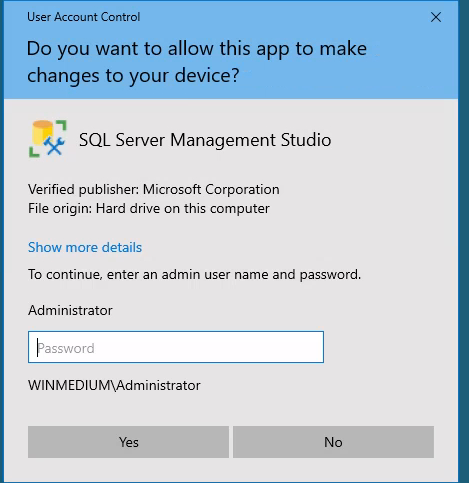
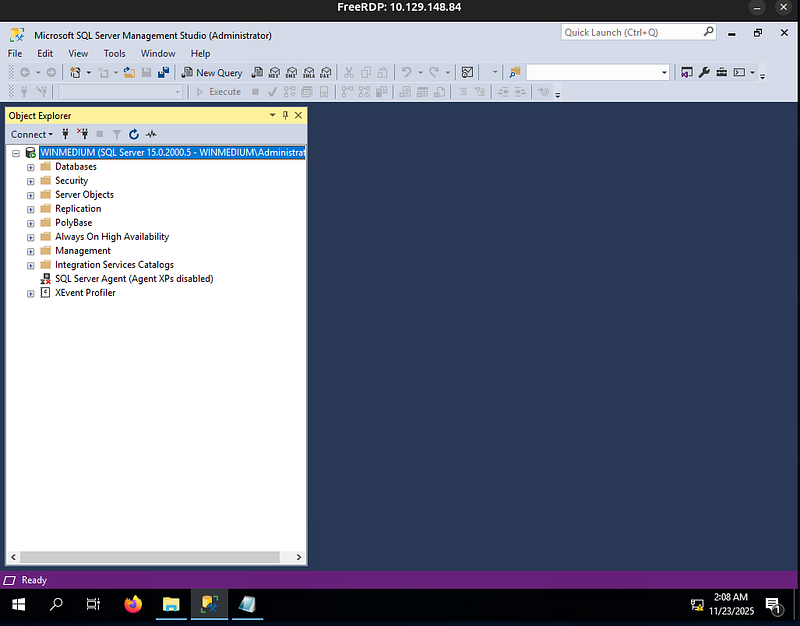
Now, I won’t go through too much hassle here; the main objective was to find the “HTB” user (and its credentials) in the database.
The database in question is accounts, with the table being dbo.devsacc.
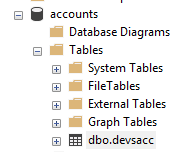
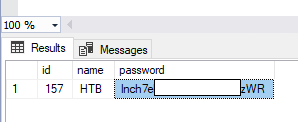
After spending a bit of time crafting queries, I sent a working one looking for any user named “HTB”, and there was a result, and the password was the flag.
SELECT TOP (1000)
    [id],
    [name],
    [password]
FROM [accounts].[dbo].[devsacc]
WHERE [name] = 'HTB';