jailCTF 2025 Experience (and Writeups)
Good day to those who are reading. I’m doing a simple writeup of the challenges I’ve solved for JailCTF 2025 event, and hopefully it’ll be a learning experience for some.
To start off, I have completed 4/32 challenges, ending with 83rd (out of 586 teams), I was doing most of these challenges solo (one-man team), and unfortunately due to load of schoolwork in University in duration of this CTF period and time constraints I wasn’t able to dedicate more time to this event. For this post I will be sharing the challenges I solved with explanations
JailCTF focuses on escaping code sandboxes (source code is provided). This is different from regular CTFs I’ve done in the past, where you typically SSH into a vulnerable instance and try to take it over using various techniques.

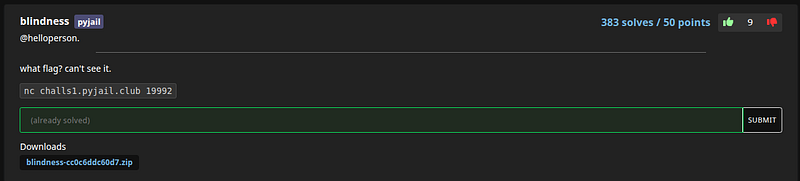
1st Challenge: ”blindless”
“what flag? can’t see it.”
#!/usr/local/bin/python3
import sys
inp = input('blindness > ')
sys.stdout.close()
flag = open('flag.txt').read()
eval(inp, {'__builtins__': {}, 'flag': flag})
print('bye bye')
Above is the ‘main.py’ Python source code given for this challenge. This was the first challenge I have completed in the event.
Looking at it it reads a line of input, closes stdout, loads the secret into a variable named flag, and then eval()s whatever we type with builtins removed. Finally it attempts to print “bye bye”.
So the idea I thought was you can’t print the secret (stdout is closed), and can’t call builtins like print or open because __builtins__ is empty
Observations
Looking at the eval environment shows the secret is handed to us directly under the name flag, so it’s in scope for any expression we submit. Although the code closes sys.stdout, it leaves sys.stderr untouched, and Python sends tracebacks and uncaught exception messages to stderr. Also, eval evaluates an expression and returns its value without printing it, then, just typing flag won’t display anything while stdout is closed. The path I saw is to trigger some kind of a behavior that produces output on stderr, namely, an exception whose message includes the flag.
Plan
Have eval raise an exception whose error message includes the flag. That way, Python prints the traceback and message to stderr, which is still open.
Exploit
I used a dict lookup w/ a missing key:
{}[flag]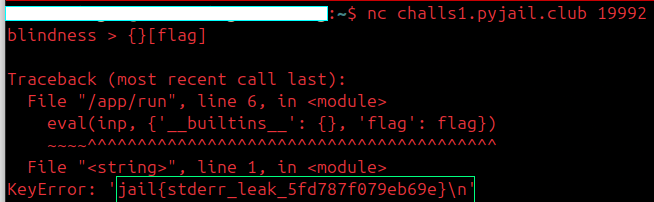
Aftermath
So what was happening in the background is the expression attempts to index the empty dict {} with the key stored in flag. The lookup fails and now Python raises KeyError(flag), and the traceback includes a line like KeyError. Because that output is written to stderr, it shows up even though stdout was closed. That single line was enough to reveal the flag in this case.
The main reason it worked is simple. The program handed the secret to the untrusted expression by binding it to the name flag. Printing was blocked, but error messages weren’t, and KeyError conveniently repeats the missing key in its message. For completeness, after eval returns the final print('bye bye') would itself fail with an I/O error because stdout is closed, and that error would also appear on stderr, but by then the challenge is long solved.
Documentation and more information related to this that I personally found useful:
The Python interpreter has a number of functions and types built into it that are always available. They are listed…docs.python.org
This module provides access to some variables used or maintained by the interpreter and to functions that interact…docs.python.org
Until now error messages haven't been more than mentioned, but if you have tried out the examples you have probably…docs.python.org
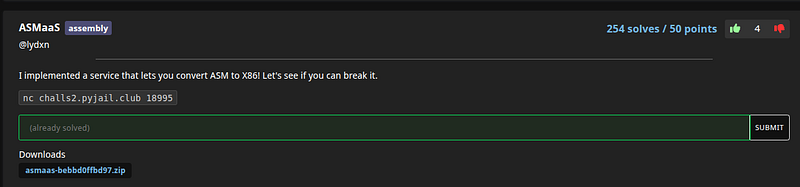
2nd Challenge: “ASMaaS”
“I implemented a service that lets you convert ASM to X86! Let’s see if you can break it.”
#!/usr/local/bin/python3
import os
os.environ['PWNLIB_NOTERM'] = '1'
from pwn import asm

try:
    shellcode = asm(input('> '), arch='amd64', os='linux')
except Exception as e:
    print('Could not compile shellcode. Exiting...')
    exit()

print('Compiled shellcode to X86!')
print(shellcode.hex(' '))
So starting this is a Assembly challenge and looking at the code and I already quickly noticed is that it never executes what I type after giving it few random inputs. It only takes my line of text, sends it straight to pwntools assembler with arch='amd64', and then prints the bytes it gets back in hex. That asm(input(...), arch='amd64', os='linux') call is the whole game: my input goes directly to the assembler with no filtering. The message that says “X86” is a bit misleading too, this is actually assembling for 64-bit amd64.
Also another detail is that assemblers aren’t just instruction encoders, they also support directives. One of those directives is .incbin, which tells the assembler to include the raw bytes of a file into the output. Since this script runs in the same working directory as flag.txt (as seen in the .zip file provided) and prints whatever bytes the assembler returns, I can turn the assembler into a file reader.

As shown, assembler opened flag.txt, copied its bytes and the program printed those bytes back to me as hex. I converted the hex to text and got the flag. This is basically a local file read (LFR) via assembly vulnerability
The lesson I took from this is that letting users feed source code to a real assembler or compiler gives them more power than you might expect. Features like .incbin can read files during assembly, so if secrets live in the same place, they’re exposed. To avoid that, probably best keep secrets out of the working directory, run the assembler in a sandbox with no access to sensitive files, or block directives entirely.

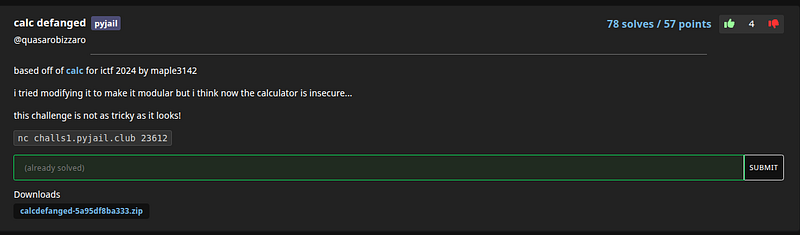
3rd Challenge: “calc defanged”
‘based off of calc for ictf 2024 by maple3142
i tried modifying it to make it modular but i think now the calculator is insecure…
this challenge is not as tricky as it looks!’
#!/usr/local/bin/python3
from sys import addaudithook
from os import _exit
from re import match


def safe_eval(exit, code):
    def hook(*a):
        exit(0)
    def disabled_exit(*a):
        pass

    def dummy():
        pass

    dummy.__code__ = compile(code, "<code>", "eval")
    print("Activating audit hook...")
    addaudithook(hook)
    val = dummy()
    # audit hooks do not allow me to do important stuff afterwards, so i am disabling this one after eval completion
    # surely this won't have unintended effects down the line, ... right?
    print("Disabling audit hook...")
    exit = disabled_exit
    return val


if __name__ == "__main__":
    expr = input("Math expression: ")

    if len(expr) <= 200 and match(r"[0-9+\-*/]+", expr):
        # extra constraints just to make sure people don't use signal this time ...
        if len(expr) <= 75 and ' ' not in expr and '_' not in expr:
            print(safe_eval(_exit, expr))
        else:
            print('Unacceptable')
    else:
        print("Do you know what is a calculator?")
Setup and Source Review
Reading this code provided, the program takes my line, checks that its length is reasonable, and then does match(r"[0-9+\-*/]+", expr). The important detail is that this is match, not fullmatch, so it only cares that my input starts with digits or the basic operators. After a valid prefix I can put any Python expression I want as long as I also satisfy the second gate of being at most 75 characters with no spaces and no underscores.
The next thing that matters is the print(safe_eval(_exit, expr)) call. Whatever safe_eval returns will be printed, and printing values triggers their str or repr. That gives me a clean place to make side effects happen after the evaluation finishes.
Inside safe_eval the code compiles my string in eval mode, swaps that code object into dummy.__code__, installs an audit hook that calls exit(0), evaluates by calling dummy(), then immediately rebinds the same exit name to a do-nothing function and returns. The hook closes over that exit so once the rebind happens the hook still fires but now calls the disabled version. I took advantage of that by making sure any audited action happens during the final print, not during the eval.
Dead Ends and Mistakes
I did make mistakes on the way. I first tried 0ortype('',(),{"\x5f\x5fstr\x5f\x5f":lambda*a:next(open('flag.txt'))})() , a payload I took a while to build thinking the leading 0 would satisfy the regex and or would force the right side to evaluate. Python parsed 0or like the start of an octal literal and threw an invalid octal literal error. I also initially targeted __str__, then I remembered that printing a tuple uses repr for each element, so I switched to __repr__. Because underscores are banned in the input I wrote the special method name using hex escapes \x5f.
The working line that got me the flag is this one after some work:
0,(type('',(),{"\x5f\x5frepr\x5f\x5f":lambda*a:next(open('flag.txt'))})())I start with 0, to satisfy the prefix match and to build a tuple. I create a tiny class with type, inject a __repr__ by spelling it with \x5f escapes to dodge the underscore rule, and return an instance. During safe_eval the object is created quietly. After eval returns, the code rebinds exit to the no-op. Then print renders the tuple, which calls my __repr__. That __repr__ opens the flag file and returns its first line. The file open is audited, but by now the hook’s exit is the disabled one, so nothing terminates and the flag prints.

That output shows the hook being installed, then defanged, and finally the tuple printing with the flag as the repr of my object.
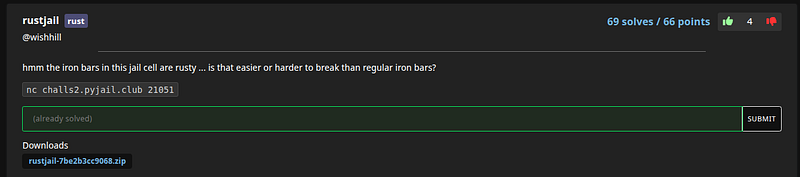
4th Challenge: “rustjail”
“hmm the iron bars in this jail cell are rusty … is that easier or harder to break than regular iron bars?”
main.py:
#!/usr/bin/python3
import string
import os

allowed = set(string.ascii_lowercase+string.digits+' :._(){}"')

os.environ['RUSTUP_HOME']='/usr/local/rustup'
os.environ['CARGO_HOME']='/usr/local/cargo'
os.environ['PATH']='/usr/local/cargo/bin:/usr/bin'

inp = input("gib cod: ").strip()
if not allowed.issuperset(set(inp)):
    print("bad cod")
    exit()
with open("/tmp/cod.rs", "w") as f:
    f.write(inp)
os.system("/usr/local/cargo/bin/rustc /tmp/cod.rs -o /tmp/cod")
os.system("/tmp/cod; echo Exited with status $?")
Before I start, I should mention this was the most time-consuming challenge out of others I’ve done, due to fact that I don’t work with Rust that often, and several mistakes were made.
Starting off from looking at Python code file, my perspective the interesting bits are the allowed characters and the fact that nothing is added to my source: whatever I type must be a complete Rust program. The whitelist removes semicolons and !, which blocks common macros like println! and panic!, but it still allows lowercase letters, :._(){}" and spaces. That is enough to write fn main(){...} and to call fully qualified std functions.
Strategy
I wanted to read flag.txt and get its contents to the terminal without println!. File reads are easy with std::fs::read_to_string, which I can type entirely with the allowed characters. Getting the bytes on screen is the trick. Since macros are blocked, I leaned on the panic pathway: make the program panic with the flag as the panic message so the runtime prints it for me.
Attempts and mistakes
I tried to force an error on a fake file and use the flag as the .expect message, so the panic displays the flag.
fn main() { std::fs::read_to_string("x").expect(std::fs::read_to_string("flag.txt").unwrap().as_str()) }This failed with a type mismatch because the last expression in main had type String and main defaults to returning (). Normally I would add a semicolon, but those are disallowed.
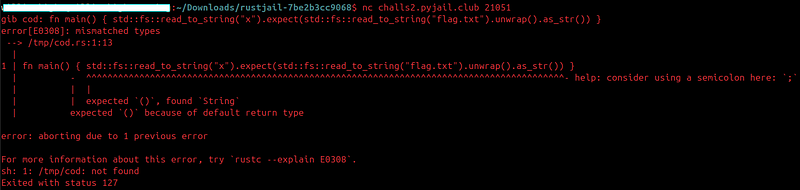
The fix was to wrap the whole expression in a function that returns (). std::mem::drop() is perfect for that.
fn main() { std::mem::drop(std::fs::read_to_string("x").expect(std::fs::read_to_string("flag.txt").unwrap().as_str())) }
This compiled and did print the flag, but it also appended the OS error from the failed "x" read, which cluttered the output with “No such file or directory.” That told me the vector worked, but the presentation was noisy.
Clean output with panic_any (Working payload)
To eliminate the extra OS error text, I switched to a pure panic payload. std::panic::panic_any is a regular function (no !) and takes an arbitrary payload. If I pass the String read from the flag file, the runtime prints just that string as the panic message line.
fn main() { std::panic::panic_any(std::fs::read_to_string("flag.txt").unwrap()) }
What happened?
The character whitelist blocks injection into the surrounding shell and removes common Rust conveniences like macros and semicolons, but it does not constrain program capability once compiled. Fully qualified std calls remain available, which makes file reads straightforward. Output becomes a formatting problem rather than a capability problem; panic_any solves that by letting me print arbitrary data without relying on macros or trait imports.
Takeaways
Character whitelists do not create a security boundary when the system still compiles and executes the supplied program with access to std. Removing ! and ; is not sufficient to prevent side effects, because functions like std::fs::read_to_string and std::panic::panic_any do everything needed to read and display sensitive data. If I were hardening this, I would treat the compiler run as untrusted and sandbox it with process isolation, resource limits, and filesystem namespace controls, and I would avoid relying on character-level filtering as the primary defense.
References (that assisted me)
std::fs::read_to_stringbacks the file-read primitive used to grab flag.txt
std::panic::panic_anyshows you can panic with an arbitrary payload (a String) without using macros.
Panics the current thread with the given message as the panic payload.doc.rust-lang.org
std::mem::dropjustifies wrapping the expression so main evaluates to () when you can’t use ;
Conclusion
Huge thanks to the JailCTF organizers for the event.