SQL for Restaurants
In this assessment, I will build a restaurant database using PostgreSQL on Ubuntu. I’ll apply SQL basics and real-world examples to create a system that manages orders, customers, and dishes. By the end, I’ll have a fully functional restaurant database. Let’s get started.
I will be using Ubuntu Linux OS for this.
- Starting the PostgreSQL Service:
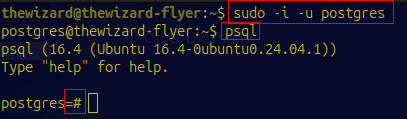
sudo service postgresql start2) Accessing the PostgreSQL Prompt via psql:
Switch to the postgres user and enter the PostgreSQL shell
Creating the Database
Let’s create a new database named restaurant:
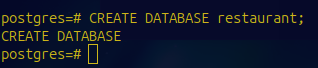
In real-world projects, separating data into specific databases improves management and scalability. It can also allow for better organization and easier maintenance as the application grows.
Modeling the Restaurant
Our restaurant database will revolve around 4 main tables:
- Customers: Who’s dining?
- Dishes: What’s on the menu?
- Orders: Who ordered what and when?
- OrderItems: What dishes are included in each order?
By modeling these entities separately, I can clearly define relationships between them, making data retrieval more straightforward.
Creating Tables
I will go ahead and set up following 4 tables:
Customers Table:
CREATE TABLE Customers (
    customer_id SERIAL PRIMARY KEY,
    name VARCHAR(100),
    email VARCHAR(100)
);customer_id: A unique identifier for each customer.name: The customer's name.email: Their contact email.
Dishes Table:
CREATE TABLE Dishes (
    dish_id SERIAL PRIMARY KEY,
    name VARCHAR(100),
    price DECIMAL(10, 2)
);dish_id: Unique ID for each dish.name: Name of the dish.price: Price of the dish.
Order Table:
CREATE TABLE Orders (
    order_id SERIAL PRIMARY KEY,
    customer_id INT REFERENCES Customers(customer_id),
    order_date DATE
);order_id: Unique ID for each order.customer_id: Links toCustomerstable.dish_id: Links toDishestable.order_date: When the order was placed.
OrderItems Table:
CREATE TABLE OrderItems (
    order_item_id SERIAL PRIMARY KEY,
    order_id INT REFERENCES Orders(order_id),
    dish_id INT REFERENCES Dishes(dish_id),
    quantity INT
);order_item_id: Unique ID for each order item.order_id: Links to theOrderstable.dish_id: Links to theDishestable.quantity: Number of units of the dish ordered.
By introducing the OrderItems table, it can allow each order to include multiple dishes, each possibly with different quantities.
Inserting Data
I will go ahead and insert some sample/generated data:
Customers:
INSERT INTO Customers (name, email) VALUES
('John Doe', 'john@example.com'),
('Jane Smith', 'jane@example.com'),
('Bob Johnson', 'bob@example.com'),
('Alice Williams', 'alice@example.com'),
('Tom Brown', 'tom@example.com'),
('Emma Davis', 'emma@example.com'),
('Liam Wilson', 'liam@example.com'),
('Olivia Taylor', 'olivia@example.com'),
('Noah Moore', 'noah@example.com'),
('Ava Anderson', 'ava@example.com');
Dishes:
INSERT INTO Dishes (name, price) VALUES
('Margherita Pizza', 9.99),
('Spaghetti Carbonara', 12.50),
('Caesar Salad', 7.25),
('Grilled Salmon', 15.00),
('Cheeseburger', 8.75),
('Chicken Tacos', 10.00),
('Veggie Wrap', 6.50),
('Beef Steak', 20.00),
('Lobster Bisque', 18.00),
('Chocolate Cake', 5.50);Orders:
INSERT INTO Orders (customer_id, order_date) VALUES
(1, '2024-10-01'),
(2, '2024-10-02'),
(3, '2024-10-03'),
(1, '2024-10-04'),
(5, '2024-10-05'),
(6, '2024-10-06'),
(7, '2024-10-07'),
(8, '2024-10-08'),
(9, '2024-10-09'),
(10, '2024-10-10');
OrderItems:
INSERT INTO OrderItems (order_id, dish_id, quantity) VALUES
(1, 1, 2),
(1, 3, 1),
(2, 2, 1),
(3, 5, 2),
(4, 1, 1),
(4, 4, 1),
(5, 4, 1),
(6, 6, 3),
(7, 7, 1),
(8, 8, 2),
(9, 9, 1),
(10, 10, 2);
Queries Testing
I will now starting testing some queries to ensure everything is in proper with earlier created tables and data.
Selecting Orders for a Given Customer
Finding all orders placed by customer with customer_id = 1:
SELECT * FROM Orders WHERE customer_id = 1;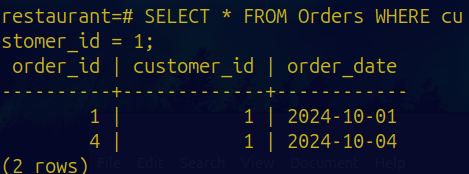
Finding Dishes a (randomized) Customer Has Had
What has John Doe ordered?
SELECT DISTINCT D.name FROM Orders O
JOIN OrderItems OI ON O.order_id = OI.order_id
JOIN Dishes D ON OI.dish_id = D.dish_id
WHERE O.customer_id = 1;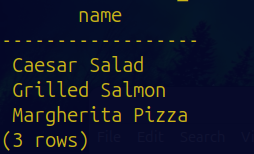
Total Amount a Customer Owes for an Order
Calculate the total for order_id = 1:
SELECT SUM(D.price * OI.quantity) AS total_amount
FROM OrderItems OI
JOIN Dishes D ON OI.dish_id = D.dish_id
WHERE OI.order_id = 1;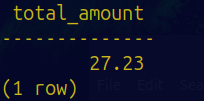
Total Amount a Customer Owes for an Order
How much did John Doe spent in total?
SELECT SUM(D.price * OI.quantity) AS total_spent
FROM Orders O
JOIN OrderItems OI ON O.order_id = OI.order_id
JOIN Dishes D ON OI.dish_id = D.dish_id
WHERE O.customer_id = 1;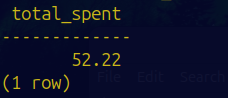
Most Popular Dish?
What is crowd’s favorite dish?
SELECT D.name, SUM(OI.quantity) AS total_ordered
FROM OrderItems OI
JOIN Dishes D ON OI.dish_id = D.dish_id
GROUP BY D.name
ORDER BY total_ordered DESC
LIMIT 1;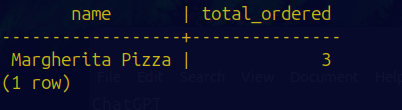
User Roles and Permissions
I will go ahead set up some user roles to mimic restaurant staff.
Creating a User for the Restaurant Owner
CREATE ROLE restaurant_owner WITH LOGIN PASSWORD 'ownerpassword';
GRANT ALL PRIVILEGES ON DATABASE restaurant TO restaurant_owner;
The owner should have full control over the database.
Creating a Role for Servers
CREATE ROLE server;
GRANT INSERT ON Orders TO server;
GRANT INSERT ON OrderItems TO server;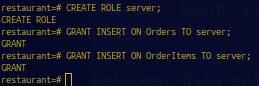
Servers can now insert new orders and order items but not alter other data.
Creating a Role for Cooks
CREATE ROLE cook;
GRANT INSERT, UPDATE ON Dishes TO cook;
Cooks can now add new dishes to the menu and update existing ones when needed.
Conclusion
I’ve completed this mini-project by using PostgreSQL, creating the database, modeling tables, inserting data, running queries, and managing user roles. A simple idea has been transformed into a fully functioning database that can closely reflect real-world restaurant operations.